

The Craft-First Revolution: Redefining Web Design Tools for the Modern Developer
The most disruptive force in modern frontend development isn't a new JavaScript framework or a CSS paradigm shift. It's a philosophical pivot in how we build user interfaces. For years, the industry has been obsessed with automation, no-code builders, AI-generated layouts, and template-driven design. But a counter-movement, championed by developers who value precision and originality, is gaining momentum. It's the "craft-first" approach. It's not about replacing the developer's skill; it's about amplifying it. This deep dive explores the technical underpinnings, practical workflows, and transformative efficiency of tools that put the developer's craft at the center of the UI creation process.
The Pendulum Swing: From Full-Stack Abstraction to Pixel-Level Control
The web development timeline is a story of layers piling onto layers. We abstracted server management with the cloud, database interactions with ORMs, and then, with the rise of Webflow, Wix, and Framer, we started abstracting the DOM itself. The promise was speed. The reality, for many professional engineers, was a loss of control. We found ourselves fighting against opaque div structures, inline-style specificity wars, and generated class names that made BEM look like lightweight poetry.
A craft-first tool is a deliberate deceleration point in an accelerating ecosystem. It doesn't generate a design from a text prompt; it doesn't sandbox you into a proprietary component library. Instead, it focuses on the most tedious, high-friction part of a developer's workflow: the translation of an existing, high-fidelity design into framework-agnostic, semantic code. Think of it as a precision scalpel, not an assembly line robot.
Deconstructing the Craft-First Workflow
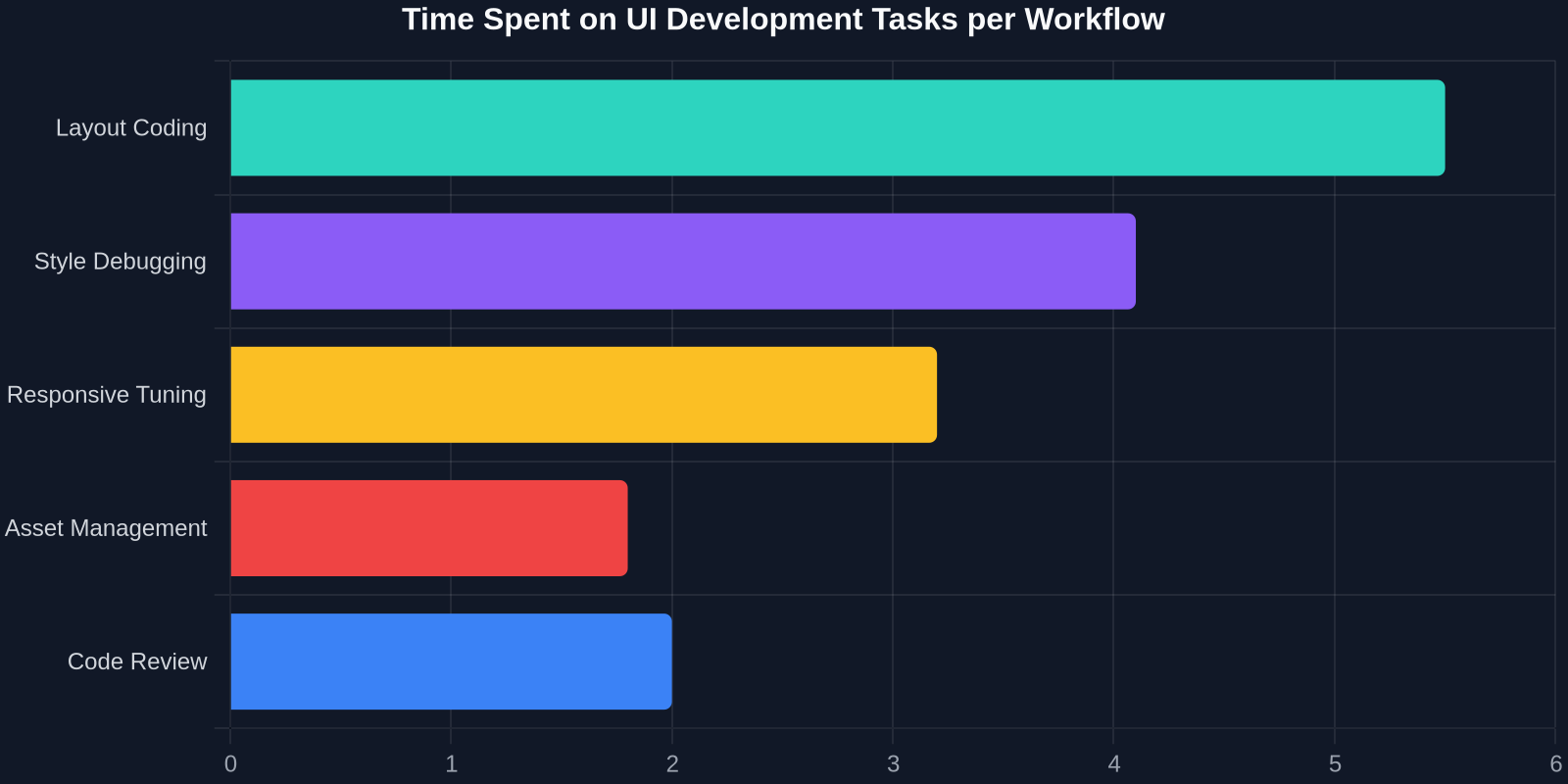
Imagine you stumble upon a beautifully executed dashboard widget on Dribbble, or a competitor has launched a navigation menu with an interaction pattern you've never seen before. The traditional workflow is brutal: you squint at DevTools, copy-paste HTML fragments, manually unwind computed styles back into declarative CSS rules, and struggle to understand why your local z-index has started a stacking context war. This isn't craftsmanship; it's forensic engineering.

A modern web design tool focused on craft, like DivMagic, restructures this loop. It operates on a simple but powerful heuristic: every visible element on the web is already built with HTML and CSS. The "design" is just a runtime rendering. The tool's job is to reverse-engineer that rendering back into an editable, human-readable, and most importantly, transferable codebase. Not a screenshot. Not a video. Raw CSS Grid and Flexbox logic, extracted, cleaned, and served to you.
How It Differs from Legacy 'Save As HTML' Tools
Anyone who has right-clicked and selected 'Save Page As' in the last decade knows the horror that awaits: a monolithic HTML file, an incomprehensible blob of critical-path CSS, and assets linked by absolute URLs that break instantly. Craft-first extraction is a fundamentally different process because it is scoping-aware. It doesn't want the entire page; it wants the component you've selected, and it wants to understand what minimal subset of styles (and only those styles) govern that component's appearance and layout.
This is achieved through a process of DOM-tree pruning and style-tree scoping. The tool analyzes the selected node's ancestor tree to determine the minimum viable markup required. It then traverses the CSSOM to collect only the computed styles that actively participate in the final rendering. Redundant inherited properties are discarded. Crucially, style dependencies are re-parented under scoped, unique class names to prevent leakage when you drop the component into your own codebase.
The Technical Anatomy of a 'Copy to Code' Engine
To truly appreciate the craft, you have to understand the mechanism. When a developer activates a tool like the DivMagic Chrome extension on a live URL, several intense computational steps fire synchronously. It's not magic; it's a perfectly choreographed sequence of browser API calls and heuristic algorithms.
1. Serialization Without Mutation
The first challenge is capturing the state of a DOM node without disturbing the live runtime. The tool clones the selected node and its essential children into a virtual fragment. This is a deep copy, but smarter. It omits script references, event listeners, and invisible metadata that bloat the markup. The goal is a pristine, static representation of the visual structure.
2. The CSS Decompression Engine
Modern CSS is almost never written the way it appears in the Computed tab. We author using pre-processors, shorthand properties, and cascading utility classes. The craft-first engine performs a decompression pass. It takes the longhand computed values (padding-top, padding-right, etc.) and, where logic permits, compresses them back into elegant shorthands. It detects conditional layouts, a grid that collapses to a single column at a max-width, and attaches those media queries to the extracted class, preserving the designer’s responsive intent.
3. Asset Re-basing
Background images, SVGs used as mask layers, and even custom font declarations are often lost in translation. The extraction layer intercepts these assets. It converts relative paths to absolute data URIs or pre-fetches the raw SVG code inline. This ensures the extracted component is self-healing. Drop it into a local React route or a Vue component file, and it renders perfectly, independent of the source server.
Why Semantic Craft Beats Constraint-Based Builders
Constraint-based layout builders (where you drag and drop inside a canvas) produce code designed for a machine’s rendering engine, not a developer's logic. They generate layers of wrapper divs and lock you into a box model that is difficult to break out of. A craft-first extraction tool works with what already exists on the wild web. The web, in its natural habitat, is messy. It’s a beautiful collage of Bulma grids, Tailwind utility stacks, hand-coded @supports queries, and ancient clearfix hacks.

By consuming this raw, organic HTML and CSS and outputting a cleaned, modular version, the tool acts as a bridge between the chaotic fire-hose of web inspiration and the strict hygiene requirements of a production codebase. You get to see the secret sauce. How did they center that modal perfectly? The tool shows you not just the result, but the exact interplay of align-items, justify-content, and transform that made it possible.
| Approach | Setup Time | Code Quality | Learning Value |
|---|---|---|---|
| Manual DevTools | High (30-45 min) | Variable, often bug-ridden | High (if you survive) |
| No-Code / AI Generator | Low (prompt-based) | Opaque, div-soup, proprietary | None |
| Craft-First Extraction | Instant (click-based) | Readable, semantic, framework-agnostic | Extremely High (inspectable output) |
Integrating Extracted UIs into Modern Tech Stacks
A component is useless if it carries a rigid technological dogma. The output from a craft-first tool should be a clean slate. Here’s how it integrates across the modern spectrum, from simple HTML to server components.
React & JSX: HTML to Ready Components
The immediate ask for a React developer is turning HTML into JSX. The craft tool automates the syntactical trudge: class becomes className, inline SVG attributes become camelCase JSX properties, and style objects are extracted for potential integration with CSS-in-JS libraries like Stitches or vanilla-extract. The result is a block of JSX that can be pasted directly into a functional component.
Tailwind CSS & Utility-First Refactoring
If your codebase uses Tailwind, raw CSS is a barrier. Advanced extraction tools are beginning to implement a concept called "semantic-to-utility decompilation." It’s a reverse-mapping engine. It analyzes the extracted CSS rule for an element, let’s say it sees display: flex; flex-direction: column; gap: 1rem;, and it maps that back to the Tailwind utility class string: flex flex-col gap-4. This is exceptionally complex due to the sheer volume of utility classes and arbitrary value syntax, but it’s the next frontier of developer craft.
Design Tokens and Theming
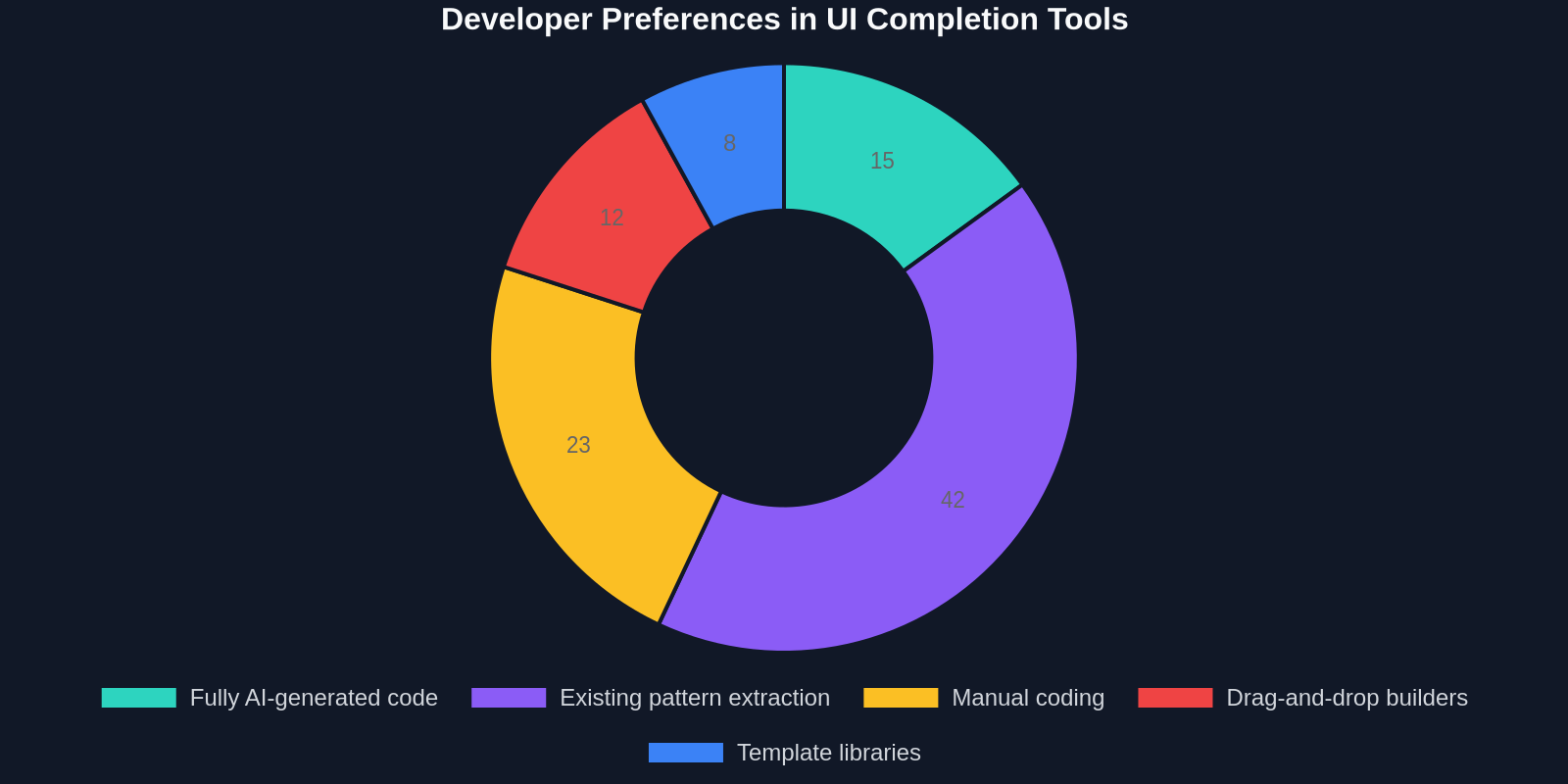
The extracted code contains raw values: hex codes, pixel values, font stacks. A craft-minded developer doesn't just drop these in. They abstract them. The best workflow is to take the extracted component, say, a card with a specific shade of blue and a specific box shadow, and immediately refactor it to consume CSS custom properties (design tokens). The tool gives you the blueprint; you inject the design system. This symbiotic relationship between extracted reality and your internal token schema is where true craft lives.
The Ethical Craft: Inspiration vs. Intellectual Property
With great extraction power comes great responsibility. The ability to copy any UI element from any website raises legitimate questions about originality and copyright. This is where the craft-first philosophy distinguishes itself from mere theft.

A craft-first tool is a learning accelerator, not a cloning lab. The code it generates is a raw material. It’s a block of marble. A developer using such a tool to rip a full page identically, including branding and copy, is missing the point and potentially violating copyright on creative works. The true craftsman uses the tool to extract a pattern. A complex grid layout. A multi-layered parallax effect. A unique navigation interaction. The developer deconstructs it, modifies the design tokens, adapts it to their brand identity, and weaves it into a wholly new composition. The tool answers the "how," but the developer still defines the "what" and the "why."
Beyond the Browser: The API-First Craft Tool
The future of craft doesn't live strictly inside a Chrome extension context menu. It lives in the terminal and the CI/CD pipeline. Imagine running a script where you point to a list of URLs and component selectors, and it generates a directory of clean, linted JSX files, complete with Unit tests for their visual regression testing.
API-first craft allows teams to build a "UI Pattern Library" not from abstract figma files alone, but from the living, breathing web. Need a search bar pattern? Instead of searching through a static design system documentation page, you could point the DivMagic API at a URL whose interactive search behavior you admire. The tool returns the static component structure. You then spend your human, creative energy on wiring the state management, injecting accessibility attributes (ARIA labels, focus traps), and optimizing the interaction logic. The machine handles the translation; the human handles the craft.
"We don't need tools that design for us. We need tools that remove the boilerplate grind, so we have the time and mental energy to design the parts that actually matter."
Building a Craft-First Culture on Your Team
Integrating a tool like DivMagic into a professional development team requires a cultural shift, not just a technical integration. Otherwise, you risk it being seen as a "cheat tool" rather than a "craft amplifier." Here’s a protocol for responsible, high-craft adoption:
1. The Inception Review
Don’t just copy-paste and ship. When a developer extracts a component, they should bring it to a short "Inception Review", a 15-minute technical deep-dive where the team analyzes the imported code. Why did the original developer use an absolute positioning trick instead of Grid? What’s the cross-browser implication? This transforms a copied UI into a team-wide learning seminar.
2. The Diffusion Refactor
In code review, enforce a "Diffusion Refactor." Any component brought in from an external source must be refactored to use the internal design system tokens before it can be merged. The GitHub diff must show that the hardcoded #FF5733 was replaced with var(--brand-secondary). This is a non-negotiable gatekeeping step for code health.
3. Custom Craft-First Macros
The best DevTool extensions are extensible. The craft-first platform should allow you to save extraction templates. Define a macro called "Extract as Tailwind Component" that automatically runs the semantic-to-utility conversion we discussed earlier. Define another called "Extract as Tested Component" that wraps the output in a pre-configured Jest testing scaffold. This is craftsman-level tooling: you are building your own design-to-code manufacturing line.
The Death of the 'Lorem Ipsum' Interface
For decades, developers built against grey boxes and placeholder text. We created beautiful, hollow UIs in Figma, rebuilt them manually in code, and only then, when we dropped in real content from a headless CMS, did we see the actual design break. Line heights collapsed. Text truncated. Responsive grids toppled.
The craft-first workflow inverts this. Instead of building a speculative container in code and hoping it works, you can scrape a real, content-dense interface from the wild. You run the tool against a complex article page on The New York Times. You get the exact CSS Grid template areas, the font loading strategies, the responsive line-length math. You strip the branding, inject your design tokens, and now you have a battle-tested content container built from actual journalistic content design. It’s learning from the real world and applying those lessons to your own product.
"Copying a UI from a production website is the ultimate reality check. It forces you to confront how messy and brilliant the real web is, and it makes your abstractions stronger."
Conclusion: The Philosophy of Amplified Craft
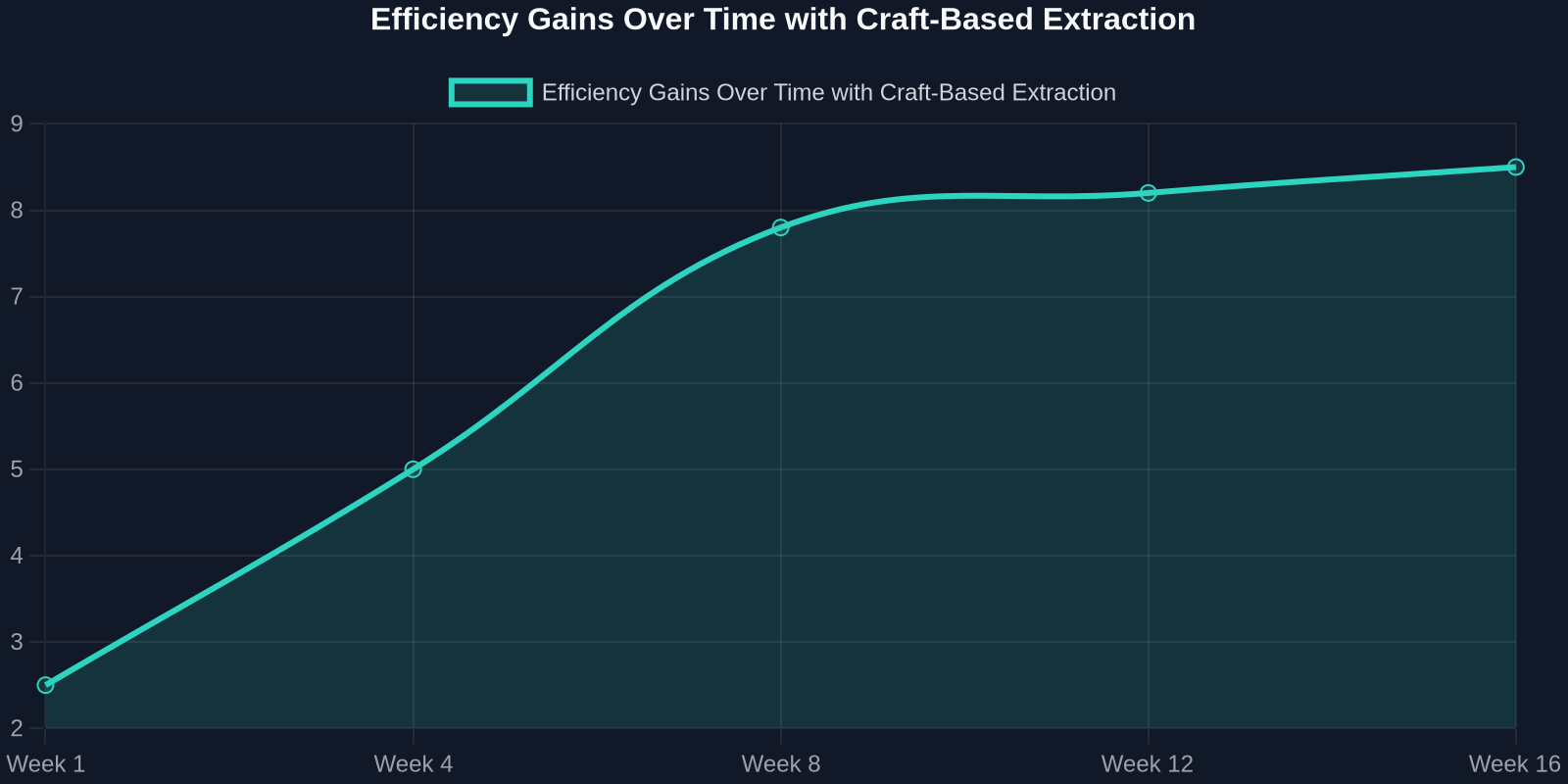
The new breed of web design tool exemplified by DivMagic doesn't mark the end of the frontend developer. It marks the end of the frontend developer as a manual transcriber. It’s the end of spending Tuesday afternoons tweaking padding values to match a screenshot you took with your phone during a competitor analysis. It’s the dawn of the developer as a curator, a code archeologist, and a high-level craftsman.
The developer’s value shifts from the mechanical to the analytical. It’s no longer about how fast can you type out the flexbox properties. It’s about how quickly can you recognize a superior flexbox implementation, capture its essence, distill it into your design system, and evolve it. The craft-first revolution gives you the keys to the kingdom of the web’s best UI patterns. It’s up to you to drive somewhere original with them.