

Modern CSS is astonishingly powerful. We can build complex layouts with Grid, craft fluid typography with clamp(), and paint intricate illustrations with gradients and masks. But with great power comes a significant amount of boilerplate. Remembering every syntax nuance for a multi-layered box-shadow or a complex cubic-bezier curve is a cognitive load many of us can do without.
That's why the modern frontend renaissance isn't just about writing better code, it's about automating the tedious parts to focus on the truly creative challenges. For developers who value the precision of handcrafted UI but not the repetitive strain, CSS generators have become an indispensable part of the toolkit.
This isn't about dragging and dropping pre-styled Bootstrap cards. This is about using intelligent tools to output the exact, vanilla CSS you need for a custom, pixel-perfect design system.
The workflow is simple but transformative: you visually sculpt a complex shape, shadow, or animation, and the tool exports the few lines of lean, standards-compliant CSS. It's the bridge between the visual intuition of a designer and the precision of a frontend architect. Let's dive into the specific components that benefit most from this generation-first approach and why this workflow is shaping the future of UI development.
The Modern CSS Landscape: Complexity Without the Bloat
We are firmly in a post-IE11 world. CSS features that were once experimental are now baseline, supported across all modern browsers. Features like aspect-ratio, CSS Grid, custom properties, and complex filter effects are the raw materials for an application's visual identity.
However, the manual authoring of these advanced styles involves holding a complex, multi-dimensional mental model. For a sophisticated background-image with multiple radial and linear gradients, you're not just picking colors; you're managing positions, color stops, and blending modes. A single misplaced percentage can throw the entire visual off.
This approach separates the intent from the implementation. The intent is "a frosted glass card with a subtle, skewed highlight." The implementation is a precise combination of backdrop-filter, background with rgba() values, and a pseudo-element with a transform: skew(). CSS generators let you define the intent visually and instantly receive the polished implementation.
The Performance Argument for Generated CSS
A common misconception is that generated code is bloated. While this can be true of page builders, modern CSS generators produce remarkably lean code because they target a single visual outcome. Unlike a framework, they don't need to ship a library of unused styles. The code they output is exactly what you would have written after a dozen rounds of trial and error, often minified and ready for your codebase.
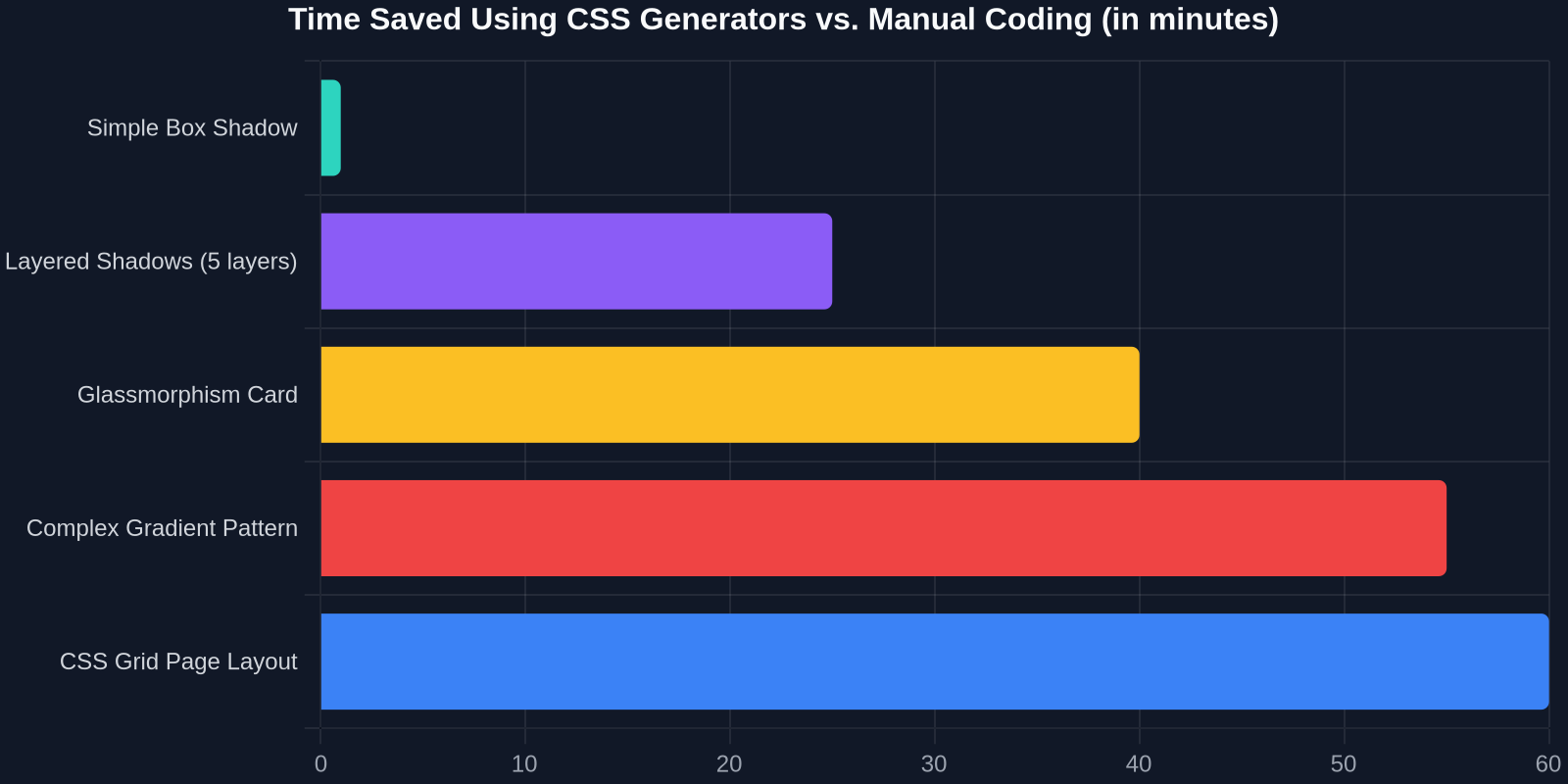
Core Components Born for the Generator Workflow
The generator-first workflow doesn't apply to everything. Atomic layout patterns are often faster to type out. But for visually complex, math-heavy, or syntax-dense properties, generators become 10x multipliers in your workflow. Let's break down the prime candidates.

1. The Sophisticated Backdrop: Glassmorphism & Gradients
The glassmorphism trend refuses to die because, when done well, it adds a beautiful depth hierarchy. Creating a true glass effect manually, however, is a balancing act.
You need:
- A semi-transparent background color (
rgba(255, 255, 255, 0.15)). - A
backdrop-filter: blur(10px). - A subtle inner border for light reflection, often requiring a
borderwith a semi-transparent white or a pseudo-element. - A box-shadow to reinforce the depth.
A dedicated backdrop or glassmorphism generator lets you drag sliders for opacity, blur radius, and saturation, outputting a cross-browser compatible block of code in seconds. This is not just faster; it's more accurate. You can visually verify the result against different background complexities without deploying to staging.
2. Advanced Shadowing: Beyond box-shadow: 0 2px 4px rgba(0,0,0,0.1);
Layered box-shadows are a pro-level technique for creating realistic depth on cards, buttons, and modals. A single shadow looks like a wireframe. Three or five layered shadows, carefully tuned in opacity and offset, create a lifelike, premium feel.
The syntax for multiple shadows is simply comma-separated values, but the design of those values is pure art. A professional shadow generator becomes your visual palette. You can add layers, adjust each one's X/Y offset, blur, spread, and color, and see the cumulative effect in real-time. The tool handles the mental math, letting you play the role of director of depth.
"Using a layered box-shadow generator turned our design critique from 'make the card pop more' to 'reduce the spread on shadow layer 3 by 2px'. It gave our team a shared, precise vocabulary."
3. CSS Grid & Complex Layouts
While CSS Grid syntax is logical, complex asymmetric layouts are mentally difficult to visualize in code. Area-based grid generators allow you to draw your layout in a grid, assigning named areas like header, sidebar-left, main-content, featured-article. The generator then outputs the pristine grid-template-areas syntax you can slot directly into your component.
This is exceptionally useful for:
- Marketing landing pages: Complex, magazine-style layouts that change drastically between breakpoints.
- Application dashboards: Defining a master app shell with resizable, collapsible panels.
- Component libraries: Ensuring a consistent, nameable grid structure for documentation examples.
4. The Art of the Curve: Cubic Bezier & Transitions
cubic-bezier() is the unsung hero of delightful user interfaces. A carefully tuned curve makes an animation feel playful, snappy, or luxuriously smooth. Manually adjusting four float numbers to achieve a specific feel is a slow, intuition-breaking process.
Visual cubic-bezier editors are the gold standard here. They provide a draggable curve interface, letting you pull the animation's "personality" into shape. The immediate output is a transition: all 0.3s cubic-bezier(0.34, 1.56, 0.64, 1); that you can confidently paste into your hover states and mount animations.
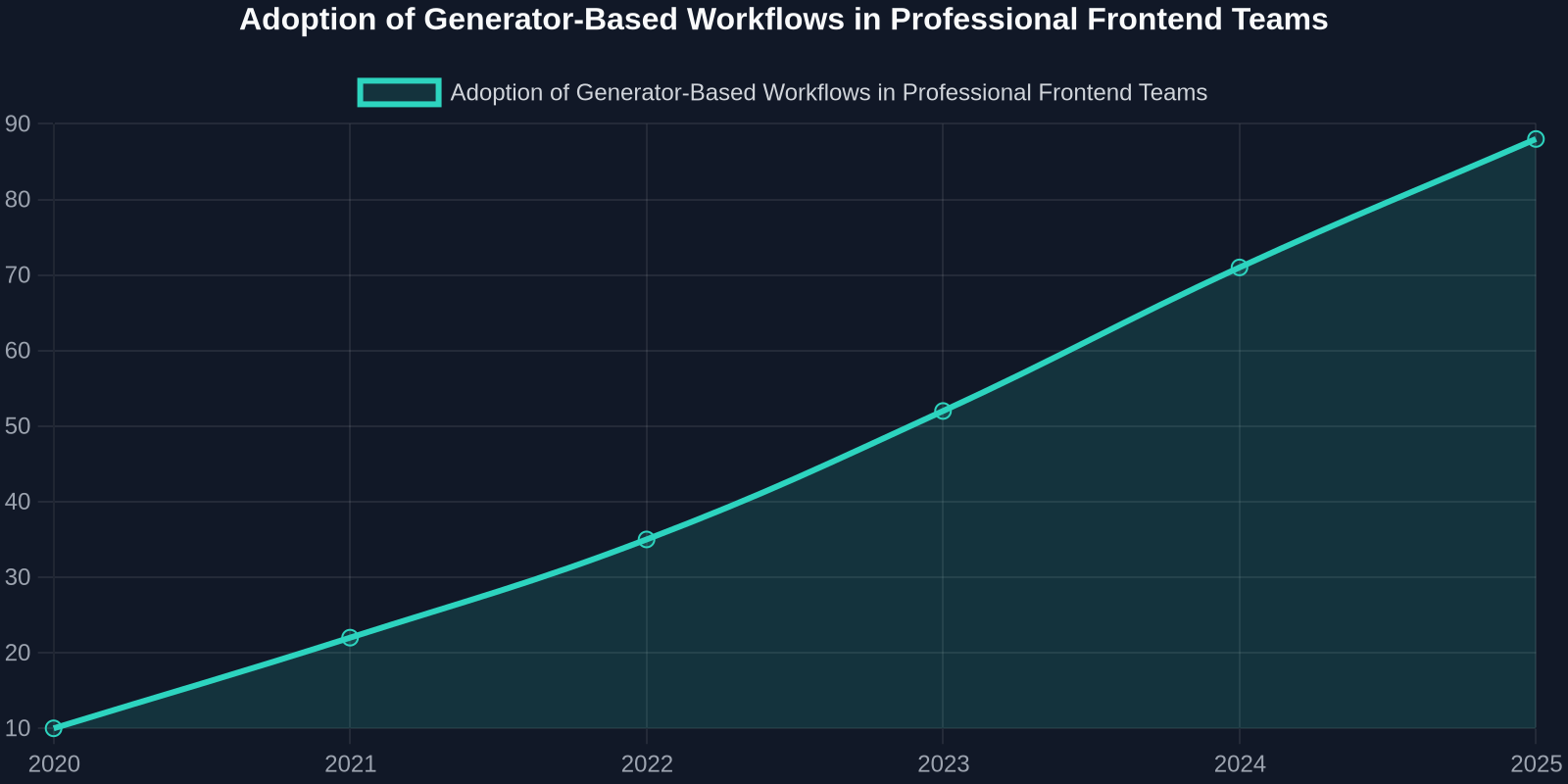
The Genuine Handcrafted Quality in Generated Components
A frontend architect might proudly state they "hand-coded" every line of their CSS. But does that mean they wrote every gradient hex code by heart? More likely, the term handcrafted refers to the curation and selection of styles, not the rote memorization of syntax.
Modern CSS generators empower you to handcraft at a higher level of abstraction. You hand-selected the exact shade of blue, the precise 4.7-degree rotation for a decorative background pattern, and the specific 22% opacity for a shimmer effect. The generator simply removed the compile step from your brain.
This is critically important for developers in agency settings or iterative product teams. When a stakeholder asks for a "more modern, tech-forward header," you can pull up an SVG background generator, craft a few options with animated mesh gradients, and present them in the browser in minutes, not after a morning of fighting with SVG paths or canvas elements.
Ideal Use Cases (Where This Workflow Shines)
This approach isn't for rebuilding Bootstrap. It's for projects where the UI is the differentiator:
- Modern SaaS Dashboards: Complex data visualizations need supporting UI that feels solid and precise.
- Creative Portfolios: The UI itself must reflect the creative standard of the work it contains.
- Web Applications: Premium feel through micro-interactions (button states, loading skeletons) that require perfectly tuned animation curves.
- Premium Branding Pages: Where a unique gradient or animated background is a hero element, not a commodity.
A Comparative Look: The Generator-Enhanced Workflow
The shift in workflow isn't just about speed; it's about the quality and explorability of the final product. Let's quantify the impact on building a single complex component: a "pro" tier pricing card with glassmorphism, a layered shadow, and a subtle animated gradient border.

| Approach | Time to Production | Visual Exploration | Code Quality |
|---|---|---|---|
| Purely Manual Coding | 2-4 hours | Limited (Costly to explore options) | Excellent, but tedious to refine |
| Copy-Pasting from Dribbble/CodePen | 1 hour | Fragmented (Adapting others' styles) | Inconsistent, requires heavy refactoring |
| Using a UI Framework (MUI, Bootstrap) | 30 minutes | None (Framework-opinionated) | Generic, heavy base files |
| Generator-Enhanced Workflow | 45 minutes | Extensive, low-cost iteration | Pristine, purpose-fit, lightweight |
Integrating CSS Generators into a Professional Development Pipeline
To a senior developer, introducing a new tool into the pipeline is a question of technical diligence. A generator is only as good as the code it outputs and how that code fits into an existing component architecture.
1. The "Output-Then-Integrate" Pattern
The best practice is not to treat a generator's output as a standalone, uneditable block. Instead, follow a two-step pattern:
- Isolate the Visual: Use the generator to create the CSS for the specific visual effect (e.g., the glassmorphism background for a
.card). - Integrate into Your System: Copy the outputted code into your project and immediately refactor the static values to use your existing CSS custom properties (variables).
/* Raw Generator Output */
.card {
  background: rgba(255, 255, 255, 0.15);
  backdrop-filter: blur(10px);
  border-radius: 16px;
  border: 1px solid rgba(255, 255, 255, 0.3);
}

/* Highly Recommended: Refactored into Design System */
.card {
  --card-blur: 10px;
  background: var(--color-glass-fill);
  backdrop-filter: blur(var(--card-blur));
  border-radius: var(--radius-lg);
  border: 1px solid var(--color-glass-border);
}
This step preserves the visual genius of the generated effect while connecting it to the maintainable, scalable tokens of your application.
2. Component Isolation with Frameworks
For React, Vue, or Svelte developers, this workflow is a perfect match. A generator easily creates the local, scoped CSS for a single, sophisticated component.
Imagine building a <GlassCard /> component. You use a generator to perfect its unique visual style once. The resulting CSS is placed directly into the component's CSS module or styled-component definition. This component becomes a single, reusable, and deterministic piece of your system. Its visual complexity is encapsulated and never bleeds into other parts of the UI.
3. Version Control and Documentation
Generated code should be version-controlled just like your hand-typed code. In fact, because it's so precise and small, it's an ideal candidate for detailed inline comments. A 10-line block of generated CSS for a complex pattern warrants a link back to the original generator and the specific settings used. This makes the effect reproducible by any team member months later.
Finding and Mastering the Right Generators
The CSS generator ecosystem is vast, and the quality varies enormously. The best tools are those that expose the full power of the underlying CSS standard, not simplify it into a toy. They work with the language, not against it. Look for generators that output standard, vendor-prefixed-free (or correctly prefixed) CSS.

A curated set of bookmarks, categorized by the challenge they solve (shadows, patterns, filters, clip-paths), becomes a silent, ever-ready member of your development team. This is not a weakness in your skillset; it's an augmentation of your capabilities.
The Future of Frontend is Composed, Not Typed
As CSS continues its rapid evolution, adding features like scroll-driven animations, container queries, and the View Transitions API, the syntax burden will only grow. We won't be memorizing more; we'll be composing more intelligently.
The generator-first workflow aligns with the core tenant of frontend architecture: separation of concerns. You are the architect, concerned with the design system, the semantics, the accessibility, and the component logic. The generator is the specialist craftsman, executing the precise syntax of a box-shadow masterpiece or a backdrop-filter symphony.
This trend, reflected in the explosion of specialized UI reference libraries, shows that the expectation for unique, high-quality interfaces is not just holding steady, it's exploding. The developers who stay ahead will be those who wield the best tools to externalize complexity, reserving their deep problem-solving faculties for the challenges that truly require human ingenuity.
The central lesson isn't that CSS is too hard to write by hand. It's that the true value of a senior frontend developer lies in their judgment, not their typing speed. A generator that outputs a flawless, modern box-shadow in 15 seconds frees you up for 15 minutes of strategic work: optimizing the layout's accessibility tree, refining the component's semantic HTML, or writing the integration tests that ensure the UI persists.
Embrace the generators. Not as a crutch, but as a lever. The code you ship will be cleaner, your designs bolder, and your development experience infinitely more satisfying.