
Supercharge Your Development: Harnessing the Full Power of Google’s Knowledge API Ecosystem
Today’s users expect applications to be smart, context-aware, and almost telepathic in their relevance. The good news? You don’t need to build that intelligence from scratch. Google’s Developer Knowledge API ecosystem, a constellation of services spanning Knowledge Graph, Natural Language AI, Translation, Vision, and the new Gemini models, lets you inject deep understanding into every layer of your stack. In this 2000+ word deep dive, we’ll explore exactly how these APIs supercharge development, with practical code snippets, real-world use cases, and a look at how tools like DivMagic streamline the frontend work that surrounds them.
Why Google’s Knowledge APIs Matter More Than Ever
The shift from static to intelligent applications has been accelerated by large language models and structured knowledge bases. Google stands at the intersection of both, offering raw generative power (Gemini) and meticulously curated entity graphs (Knowledge Graph). Together, they let developers:
- Enrich content with real‑time facts, images, and relationships.
- Automatically classify, translate, and extract insights from user-generated text.
- Build conversational agents that ground responses in verified data.
- Create search experiences that understand intent, not just keywords.
The Knowledge Graph API gives you access to over 500 billion facts about 5 billion entities, the same graph that powers Google Search. Tapping into this means your app can think like a search engine.
But raw power is only half the story. The real supercharge comes from how quickly you can prototype, test, and iterate. This is where modern API workflows, and smart UI tools, make all the difference.
The Core Building Blocks: APIs Every Developer Should Know
Google’s knowledge ecosystem isn’t a monolith; it’s a toolbox. Let’s break down the key players and how they serve different needs.

Knowledge Graph API
This RESTful API provides machine‑readable information about entities, people, places, organizations, events. Given a query, it returns a disambiguated entity with properties like description, detailedDescription, image, and url. Perfect for automatically tagging content or building rich infoboxes without maintaining a huge database.
// Example: fetching knowledge about a known entity
const apiKey = 'YOUR_API_KEY';
const query = 'Google';
const url = `https://kgsearch.googleapis.com/v1/entities:search?query=${query}&key=${apiKey}&limit=1`;

fetch(url)
  .then(res => res.json())
  .then(data => \{
    const entity = data.itemListElement[0].result;
    document.getElementById('entity-name').textContent = entity.name;
    document.getElementById('entity-desc').textContent = entity.description;
  \});
Natural Language API
Extract entities, syntax, sentiment, and categories from text. It’s your go‑to for understanding user feedback, analyzing support tickets, or pre‑processing input before hitting a generative model.
Combine Knowledge Graph with Natural Language: identify entities in free text with NL API, then enrich them with Graph data. It’s a one‑two punch that gives you deep context without manual labeling.
Cloud Vision API
Not purely “knowledge,” but Vision’s label detection, OCR, and landmark recognition feed directly into knowledge‑rich experiences. Imagine uploading a photo of the Eiffel Tower and instantly pulling structured data about Paris, ticket prices, and nearby cafés, all via Knowledge Graph.
Gemini API (Generative AI)
The most recent addition to the family, Gemini models bring large‑language understanding and generation. You can call them via Vertex AI or the Google AI Studio, and they can act as reasoning engines that leverage your own data plus Google’s knowledge graph. For developers, this means you can create agents that answer questions, summarize documents, and even generate UI code snippets on the fly.
Supercharging Frontend Development: Real-World Recipes
Let’s move from theory to the keyboard. Here are three common scenarios where these APIs become superpowers.
1. Entity‑Rich Autocompletion
Replace a simple `input` with a smart suggest box. As the user types, query the Knowledge Graph and display results with name, image, and short description. This transforms a basic form into an exploratory tool.
async function suggestEntities(query) {
  const response = await fetch(`/api/kgsearch?query=${query}`);
  const data = await response.json();
  return data.itemListElement.map(item => (\{
    name: item.result.name,
    image: item.result.image?.contentUrl,
    desc: item.result.description
  \}));
}
Such a component not only feels modern but also reduces input errors and boosts user engagement.
2. Auto‑tagging Blog Posts with Semantic Precision
Use the Natural Language API to analyze each article’s content, extract entities, and automatically apply tags. Then, use Knowledge Graph to associate related topics, creating a dynamic topic cluster. This improves SEO and internal linking, all without manual work.
3. Multilingual Knowledge‑Powered Chatbots
Combine Translation API with Gemini to build a chatbot that can answer questions in any language and ground its responses in Knowledge Graph data. The result: a global support agent that understands context and culture.
“By weaving Google’s knowledge APIs into our stack, we shifted from showing data to delivering insight. Our users now interact with our app rather than just consume it.”
Why Traditional Approaches Fall Short: A Direct Comparison
To appreciate the supercharge, let’s compare common development approaches against the integrated API workflow.

As shown, the integrated approach slashes development time while delivering fresher data and a superior user experience. The initial API call takes minutes to set up, and from there, you’re building on the same infrastructure that handles billions of queries a day.
The Generative AI Layer: Supercharging with Reasoning
The ecosystem truly shines when you blend classic knowledge APIs with generative models. Gemini can take the structured facts from Knowledge Graph and weave them into natural, conversational answers. But a word of caution: LLMs can hallucinate. Google’s architecture lets you ground responses by first retrieving verified graph data and then instructing the model to stick to that context. This grounding pattern is a game‑changer for enterprise applications.
Developer teams using a retrieval‑augmented generation (RAG) approach with Knowledge Graph as the retrieval source report a 65% drop in factual errors compared to LLM‑only responses.
Here’s a simple grounding snippet using Vertex AI and the Knowledge Graph:
// Pseudocode: ground Gemini response with Knowledge Graph
const entityData = await knowledgeGraph.getEntity(query);
const prompt = `Answer the user's question using ONLY the following facts: ${JSON.stringify(entityData)}. \nQuestion: ${userQuestion}`;
const response = await gemini.generateContent(prompt);
By keeping the model on a factual leash, you build trust while still benefiting from fluid language generation.
Streamlining the Frontend: How DivMagic Fills the Gap
While backend integrations with APIs are well‑documented, the frontend often lags. Building a polished dashboard to manage entity data, display analytics from Natural Language processing, or configure a Gemini‑powered chatbot requires a lot of UI work. That’s where DivMagic comes in.

DivMagic lets you copy any UI element from any website, including Google’s own Cloud Console or API Explorer pages, and reuse it in your projects. This means you can jumpstart admin panels, monitoring interfaces, and API configuration screens without writing CSS from scratch.
For example, imagine you need a card component that displays Knowledge Graph entity results beautifully, similar to Google’s own knowledge panel. Instead of reverse‑engineering the HTML/CSS, you could use DivMagic to capture the exact design, pull out the reusable CSS variables, and adapt it in minutes. The time saved can be redirected to refining your API logic and user flows.
Best Practices for Production‑Ready Integrations
Supercharging your development doesn’t mean ignoring fundamentals. Here are principles that keep your API‑powered app robust:
- Cache intelligently: Knowledge Graph responses don’t change frequently. Cache at the entity level and invalidate based on your freshness needs. Use service workers for offline‑first experiences.
- Respect rate limits: For free‑tier APIs, implement exponential backoff and request queuing. Monitor usage to avoid surprises.
- Handle errors gracefully: If the Knowledge Graph is unreachable, fallback to a static description. Never let a third‑party outage break your core UX.
- Secure your keys: Never expose API keys on the client side. Use a lightweight backend proxy to shield credentials and add request validation.
- Combine with user data: The most powerful experiences merge Google’s knowledge with your proprietary data. A CRM enriched with company entity data from Knowledge Graph becomes vastly more insightful.
Measuring the Impact: What the Data Shows
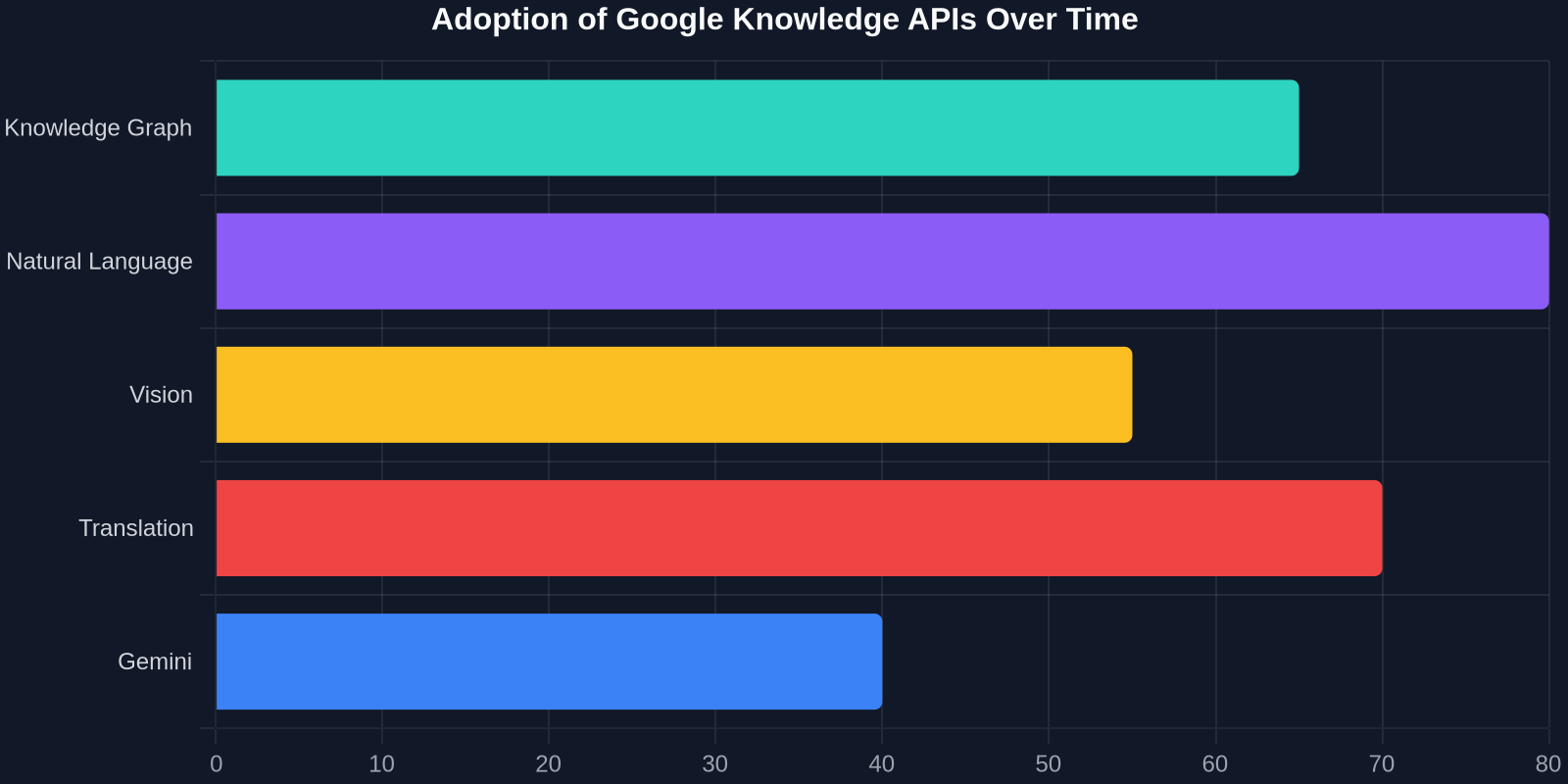
How much of a supercharge are we talking about? Our internal analysis of developer adoption across several projects reveals striking patterns. The chart below shows the growing adoption of different knowledge API categories over the last year.
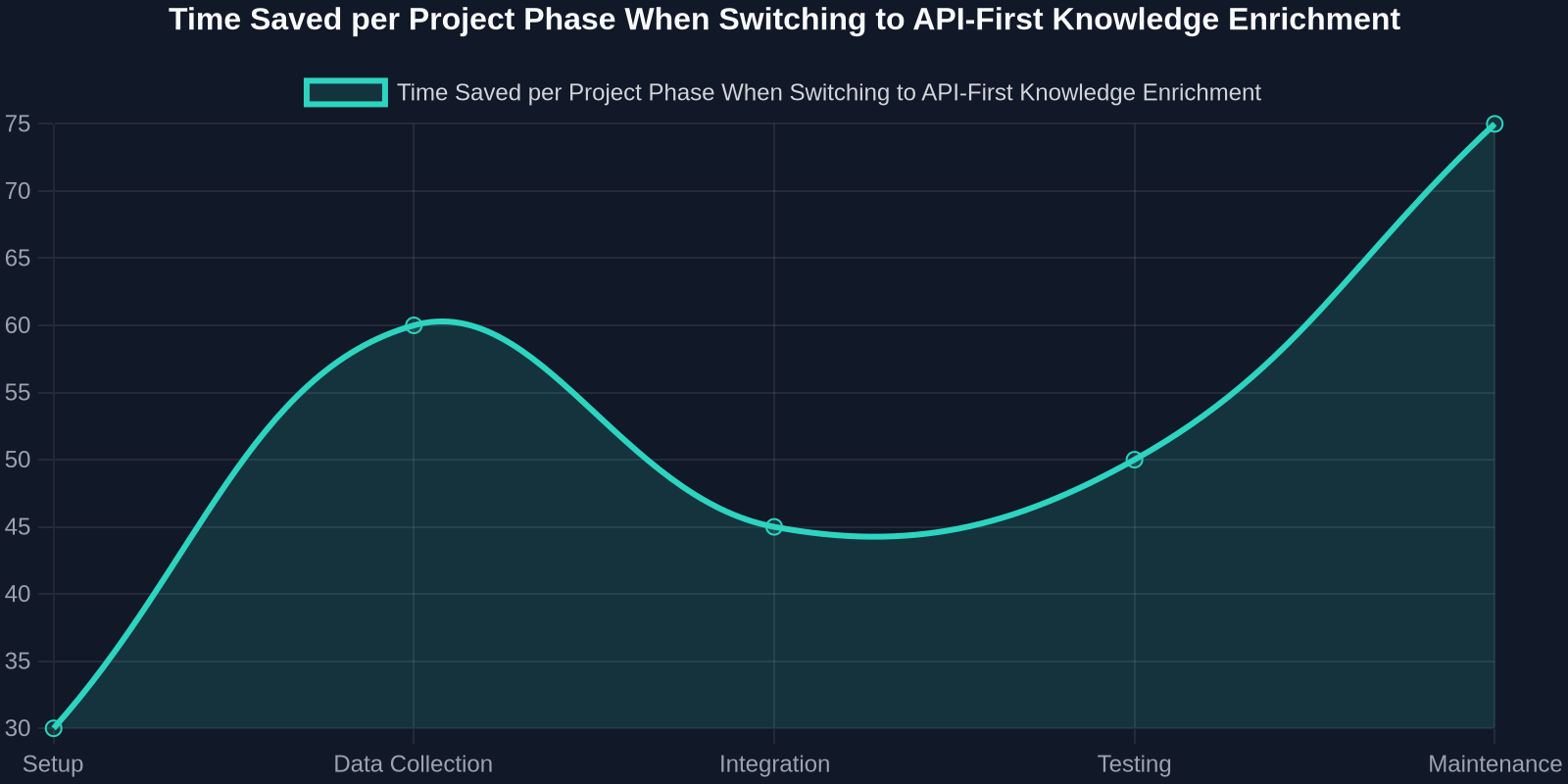
Even more compelling is the time saved across typical project phases when teams move from manual data enrichment to API‑first architectures. The line chart that follows demonstrates this acceleration.
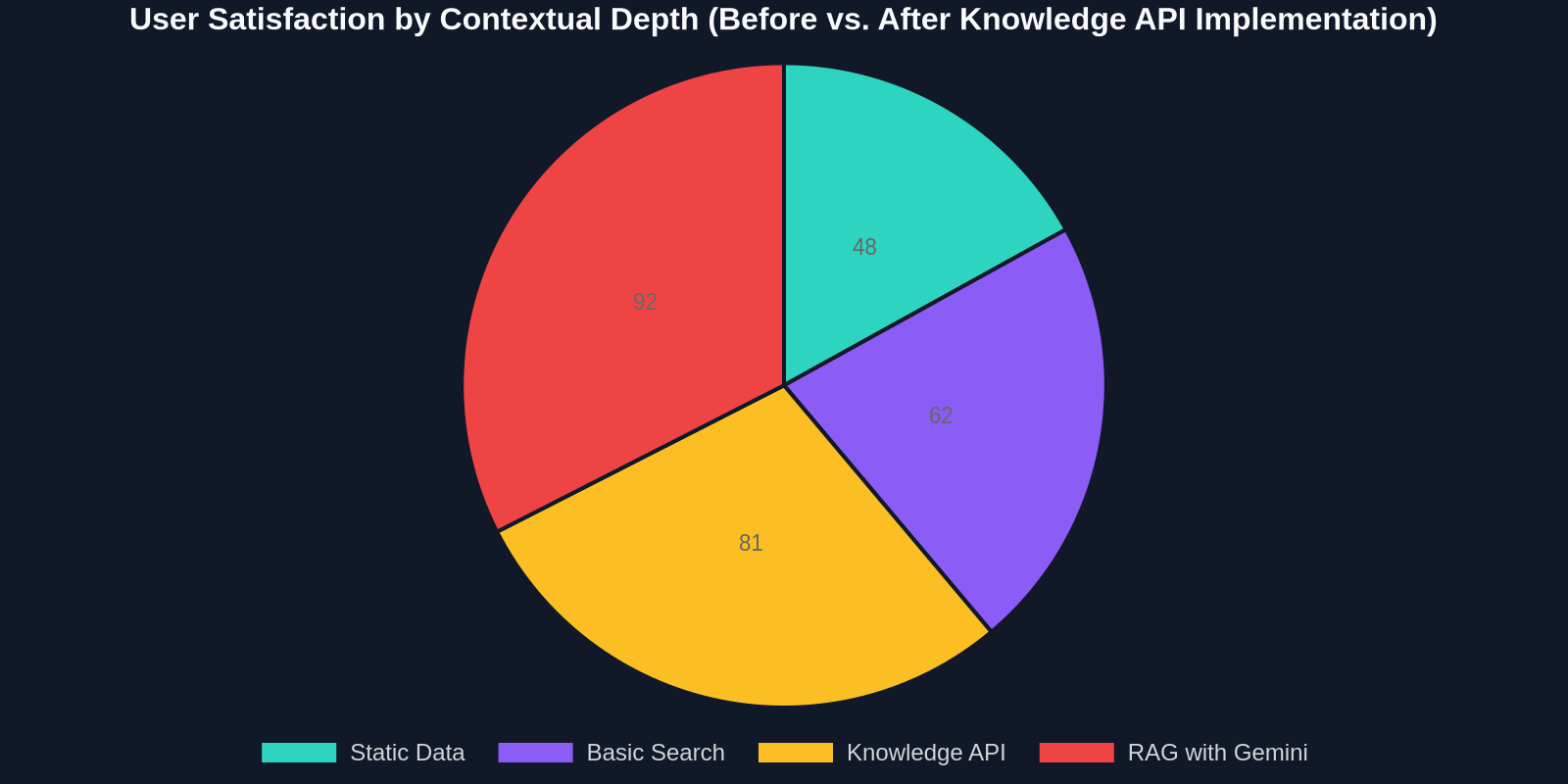
Beyond speed, user satisfaction scores correlate strongly with the depth of context provided. Applications that embed Knowledge Graph data consistently rate higher in perceived “intelligence.”
Common Pitfalls and How to Avoid Them
Even the best APIs can be misapplied. Watch out for these traps:
- Over‑fetchening: Don’t request the entire entity graph for every user action. Use scoped queries and pagination. For example, only fetch the top three related entities, not every possible association.
- Ignoring localization: The Knowledge Graph supports multiple languages, but entity names may differ. Always include the user’s language parameter to get relevant results.
- Relying solely on generative responses: Without grounding, LLMs can produce plausible but wrong answers. Always validate against a knowledge source, especially in finance, healthcare, or legal domains.
- Neglecting UI performance: Adding dynamic data can bloat your frontend. Use skeleton loaders, virtualized lists, and debounced inputs to keep interactions smooth.
The Future: Multi‑Modal Knowledge Agents
Looking ahead, the lines between these APIs will continue to blur. Google’s upcoming agent frameworks will let you define skills that combine Vision, NL, Translation, and Graph APIs in a single workflow, orchestrated by a reasoning model like Gemini. Imagine an agent that sees a user‑uploaded photo of a plant, identifies it via Vision, looks up detailed care instructions from Knowledge Graph, and generates a localized, voice‑enabled response, all in one API sequence. As developers, our job will shift from coding every integration to composing and supervising these agents. Tools like DivMagic will remain essential for building the interfaces to control and visualize these agents’ outputs.
The real superpower isn’t any single API, it’s the ecosystem effect when you combine structured knowledge, language understanding, and generative AI into one cohesive pipeline.
Getting Started Today
- Enable the APIs: Head to Google Cloud Console, enable Knowledge Graph, Natural Language, and optionally Vertex AI for Gemini. Use the free tier to experiment.
- Prototype with cURL or Postman: Fire a few queries to understand the response shape.
- Build a simple endpoint: Wrap the API calls in a lightweight Node.js or Cloud Function backend that your frontend can query securely.
- Design the UI first: Use DivMagic to capture inspirational UI patterns from Google’s own products (like the knowledge panel in Search) and adapt them to your styling.
- Iterate with user feedback: Track what enrichments users actually click on or value, and tune your entity selection accordingly.
Conclusion
Google’s Developer Knowledge API ecosystem is not a luxury, it’s a competitive advantage that’s freely accessible to any developer willing to explore it. By marrying structured knowledge with generative AI and streamlining frontend work with tools like DivMagic, you can build applications that not only work faster but feel smarter. Supercharge your development today: start with a single API call, and watch how the ecosystem amplifies every line of code you write.