
From Concept to Code: How DivMagic Redefines Web Design Workflow with a Focus on Digital Craft
Goran Arandjelović’s recent exploration on CreativeBloq, I built a powerful new web design tool that focuses on craft, not automation, hits a nerve that every frontend developer and web designer knows all too well. The industry is flooded with “drag-and-drop” builders and AI generators that promise to replace human input entirely. Yet the result is often a Frankenstein of bloated code, generic layouts, and a complete detachment from the raw materials of the web: HTML, CSS, and JavaScript. The real conversation isn’t about eliminating the craft; it’s about automating the tedious parts so we can spend more time perfecting the art. This is precisely the gap DivMagic was built to fill, transforming the way developers interact with existing UI elements without sacrificing the soul of hand-coded design.
The modern web design process exists in a paradox. We have immense power at our fingertips, yet the workflow from “seeing” a great design to “implementing” it locally is often clunky and manual. DivMagic reimagines this pipeline as a seamless handoff between inspiration and implementation. Instead of generating a full website from a vague prompt, DivMagic acts as a surgical, craft-enhancing instrument. It allows you to copy any UI component from any live website, be it a complex navigation bar, a perfectly styled card component, or a fluid container query pattern, and instantly convert it into clean, adjustable Tailwind CSS, vanilla CSS, or inline styles. It’s not automation that replaces the designer; it’s automation that serves the developer.
The Pitfalls of Automation-Heavy Design Tools
To understand the value of a craft-focused tool, we need to analyze what has gone wrong with the “automation-first” mindset. Traditional AI website builders and WYSIWYG editors prioritize speed over integrity. They abstract the code layer away behind a visual interface, leading to a disconnect that hurts long-term project maintainability.
The Divergence from Web Standards
When a tool generates an image-first or absolute-positioned layout, it often neglects logical document flow, semantic HTML, and accessibility standards (like WCAG). The craft of web design lies in how flexbox items wrap on a narrow viewport or how a CSS Grid defines a rhythmic layout system. A craft-focused tool must produce code that a developer would be proud to check into a repository, standards-compliant, scalable, and human-readable.
The Maintenance Nightmare
Websites built by full automation often suffer from "spaghetti code" logic. If a developer needs to tweak a hover state or integrate a React state hook, they often have to fight the tool. With DivMagic, the output is just code. You copy the exact hover effect, transition, and active state from a high-end reference site directly into your code editor, maintaining full control and ensuring that the craft of interaction design remains intact.
DivMagic’s Core Philosophy: Enhancing Craft Through Precision Replication
DivMagic is not a complete website builder. It is an intelligent extraction layer that bridges the gap between the “inspiration web” and the “local environment.” This distinction is crucial for maintaining a craft-focused workflow.

Bridging Inspect Element and Development
The traditional workflow to copy a UI element is laborious: right-clicking "Inspect," navigating the Elements panel, filtering through minified class names, copying HTML structures, and painstakingly rewriting or converting utility classes. DivMagic collapses this into a single click. It traverses the shadow DOM, resolves computed styles, and surgically extracts only the component you select, not the entire page. This means you can walk through a cutting-edge design inspiration at CreativeBloq, find one specific interactive card, and have its complete Tailwind CSS or Vanilla CSS structure ready to paste into your Next.js project instantly.
Technical Deep Dive: How the Extension Preserves Your Design Intent
A critical aspect of the craft is preserving the original designer’s intent. The tool must interpret relational sizing, dynamic theming, and responsive behaviors correctly. Let’s look under the hood at how DivMagic handles complex CSS architectures.
Intelligent Style Resolution and Conversion
Extracting styles from the DOM is trivial; making them smartly usable is the craft. DivMagic analyzes the cascade to distinguish between inherited styles, layout-centric properties, and decorative aesthetics.
- Layout Preservation: It detects if an element uses Flexbox or Grid and, crucially, identifies how spacing is achieved (e.g.,
gapvs.margintricks). - Tailwind CSS First-Class Support: The engine maps computed pixel values to the closest Tailwind utility class (e.g.,
padding: 16px->p-4), using a heuristic that balances specificity with semantic utility class length. This avoids the random, verbose class soup that generic converters produce. - Variable and Theme Awareness: If a site uses CSS custom properties (
var(--primary-color)), the tool intelligently captures the computed value while offering the option to extract the variable itself for design systems.
| Approach | Time to Replicate a Component | Code Maintainability |
|---|---|---|
| Manual 'Inspect and Copy' | 10–20 mins | High (requires manual naming) |
| AI Generators (Prompt-based) | 1–2 mins | Low (often nonsensical structure) |
| DivMagic (Craft-focused) | 3 seconds | High (human-readable, editable) |
Tailoring the Craft: Practical Use Cases for Frontend Developers
The tool’s focus on craft becomes most evident in the granular, day-to-day tasks of a UI engineer. It’s not about building a whole page; it’s about the micro-interactions.

Building a Component Library from the Open Web
Teams adopting a “Headless UI” approach often need real-world stress tests for their components. When you see a flawlessly executed mega-menu on someone else’s portfolio, DivMagic lets you extract the raw CSS strategy for the sub-menu positioning and transition logic. You learn the craft of the implementation, adapt it to your design system, and level up your team’s UI quality.
Debugging and Learning Layouts
For junior developers, the extension is an educational powerhouse. By copying a complex masonry layout or an intricate loading skeleton, a developer can pull the isolated CSS into CodePen or their local editor. They can then tinker with the grid-template-columns or animation keyframes to understand the why behind the design, directly accelerating the craft of their own work.
The DivMagic Workflow in a Craft-First World
Let’s replace the vague, prompt-heavy abstraction with a definitive, developer-respecting protocol. The workflow shifts from “generate and pray” to “select, extract, and refine.”
- Discovery: You find an inspirational website (perhaps linked from CreativeBloq’s "Inspiration" section).
- Surgical Selection: Hover over the exact component, a pricing table, an interactive chart, a testimonial carousel.
- Configurable Extraction: Choose your output format. Tailwind? Pure CSS Modules? Styled-components? DivMagic adapts to your stack, not the other way around.
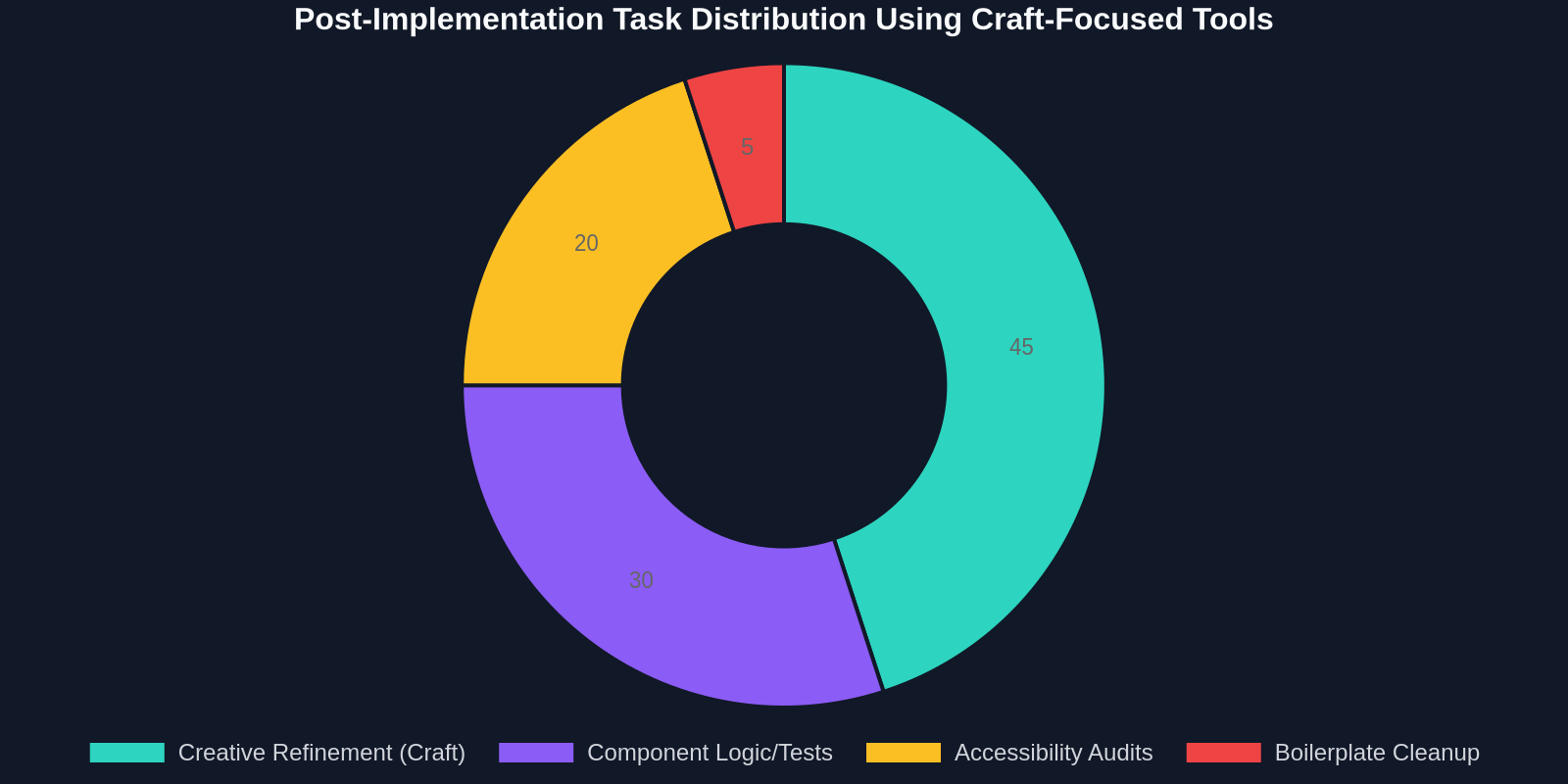
- Human Craft Phase: Paste the clean code into your codebase. This is where the craft peaks. The tool has removed 90% of the grunt work, giving you more time to refine animations, integrate logic, and ensure pixel-perfect responsiveness.
"The most powerful design tool isn't the one that thinks for you; it's the one that gets out of your way, eliminates friction, and hands you a clean canvas of code to master."
Measuring the Impact on Developer Velocity
Quantifying the efficiency of a craft-focused tool versus total automation requires looking at long-term project agility. A drag-and-drop builder might create a page in an hour, but five hours later, a developer is stuck reverse-engineering its CSS conflicts. DivMagic’s value accrues over a sprint.
Beyond Static Copying: The Future of Web Craft Tools
Arandjelović’s insight into “craft over automation” resonates with the shift toward local-first design and collaborative engineering. The next frontier isn't removing the developer from the code, but embedding powerful intelligence into the developer's workflow.

Integrating with Design Systems
Imagine a future version of the workflow where DivMagic not only extracts a component’s style but automatically maps it to your existing design tokens. If the extracted hex code is #1A2B3C, the tool detects it’s a semantic surface-secondary token in your library and aligns the variable. This enhances the craft of systematic design, ensuring consistency.
The Rise of Interaction Extraction
The craft of web design is increasingly defined by motion design. Copying a static element is table stakes. The future is copying the subtle micro-interaction physics, the precise cubic-bezier spring curve of a modal opening or the staggered list animation. This evolution will empower developers to replicate not just the look, but the feel of premium digital experiences.
Overcoming the "Copy-Paste Developer" Stigma
A craft-focused tool helps dismantle the outdated stigma that copying elements from the web is lazy. In reality, every design is a remix. The timeless “Good artists copy, great artists steal” adage, often tangled with Picasso or Jobs, applies profoundly here. The craft isn’t in inventing a new border-radius curve; it’s in how that curve integrates with a layout’s vertical rhythm.
By automating the grunt extraction, DivMagic frees your mental bandwidth to be a curator of the web. You gather the best patterns, analyze their scalability, and synthesize them into a coherent, unique product. The tool handles the bits; you handle the atoms.
Developer Adoption and Community Craft
Tools that respect the craft inherently foster stronger communities. Instead of library-specific proprietary formats, the tool exports standard code. This means a React developer sharing a snippet on Twitter is instantly usable by a Svelte or Vue developer. The focus returns to the universal materials of the platform, HTML and CSS, strengthening the web’s foundational knowledge base.
The Economics of Craft-First Tools in Professional Environments
For agencies and product teams, the business case for DivMagic aligns with reducing technical debt and developer churn. Developers experience "frustration fatigue" when forced to implement poorly designed tools or write repetitive boilerplate. A craft-first browser extension increases job satisfaction directly correlate to higher code quality and lower turnover.
Selecting Your Stack: A Consultant’s View
When auditing a tech stack for a large-scale rebuild, I evaluate tools by their abandonment footprint. Can you eject from the tool tomorrow and keep working? With a prompt-based builder, the answer is usually no. With a component-level extraction tool like DivMagic, the output is just your source code. The “eject” button is always pressed; you are always holding the raw materials. This makes it a zero-risk addition to any enterprise pipeline.
"A tool that leaves you with clean, standalone code is a tool that respects the temporal nature of the web. It builds your craft, not its own walled garden."
Conclusion: The Craft Renaissance in Web Development
The pendulum is swinging back from “no-code” absolutism toward “pro-code augmentation.” The article from CreativeBloq highlights a crucial counter-movement in our industry: the desire for tools that feel like an extension of the developer’s mind, not a replacement for it. DivMagic exemplifies this by converting the internet into an infinite component library, not a pre-packaged theme shop.
It’s time to stop fighting with inspectors and battling specificity wars. The craft of building for the web involves a deep understanding of cascading, layout, and interaction design. DivMagic doesn’t obscure that complexity; it hands it to you, gift-wrapped in clean Tailwind and pure CSS. It’s automation dedicated to the digital craftsperson, ensuring that the web remains a playground of hand-tuned, beautifully inefficient human creativity.