

AI Coding Tools Trigger a New Burnout Wave Among Developers
In the past two years, the software development landscape has been reshaped by AI-powered coding assistants. GitHub Copilot, ChatGPT, Claude, and a wave of specialized tools promise to make developers faster, reduce boilerplate, and even write entire functions from natural language prompts. Yet beneath the surface of skyrocketing efficiency, a quieter crisis is unfolding: developer burnout is spiking, and AI tools are a central piece of the puzzle.
On the surface, the logic seems flawless, AI handles repetitive tasks, so developers can focus on creative problem‑solving. However, the reality reported by thousands of engineers paints a different picture. The acceleration that AI enables often intensifies expectations, blurs work‑life boundaries, and introduces a cognitive load that traditional coding never did.
This article unpacks the data behind the new burnout wave, explores the psychological mechanisms at play, and provides evidence‑based strategies to harness AI without sacrificing your sanity.
The Productivity Paradox: Faster Coding, Higher Pressure
If you could finish a sprint’s worth of tasks in three days, what would your manager expect next? For many teams, the immediate answer is “more tasks.” The introduction of AI coding assistants has compressed delivery timelines, but organizational expectations have often compressed even faster.
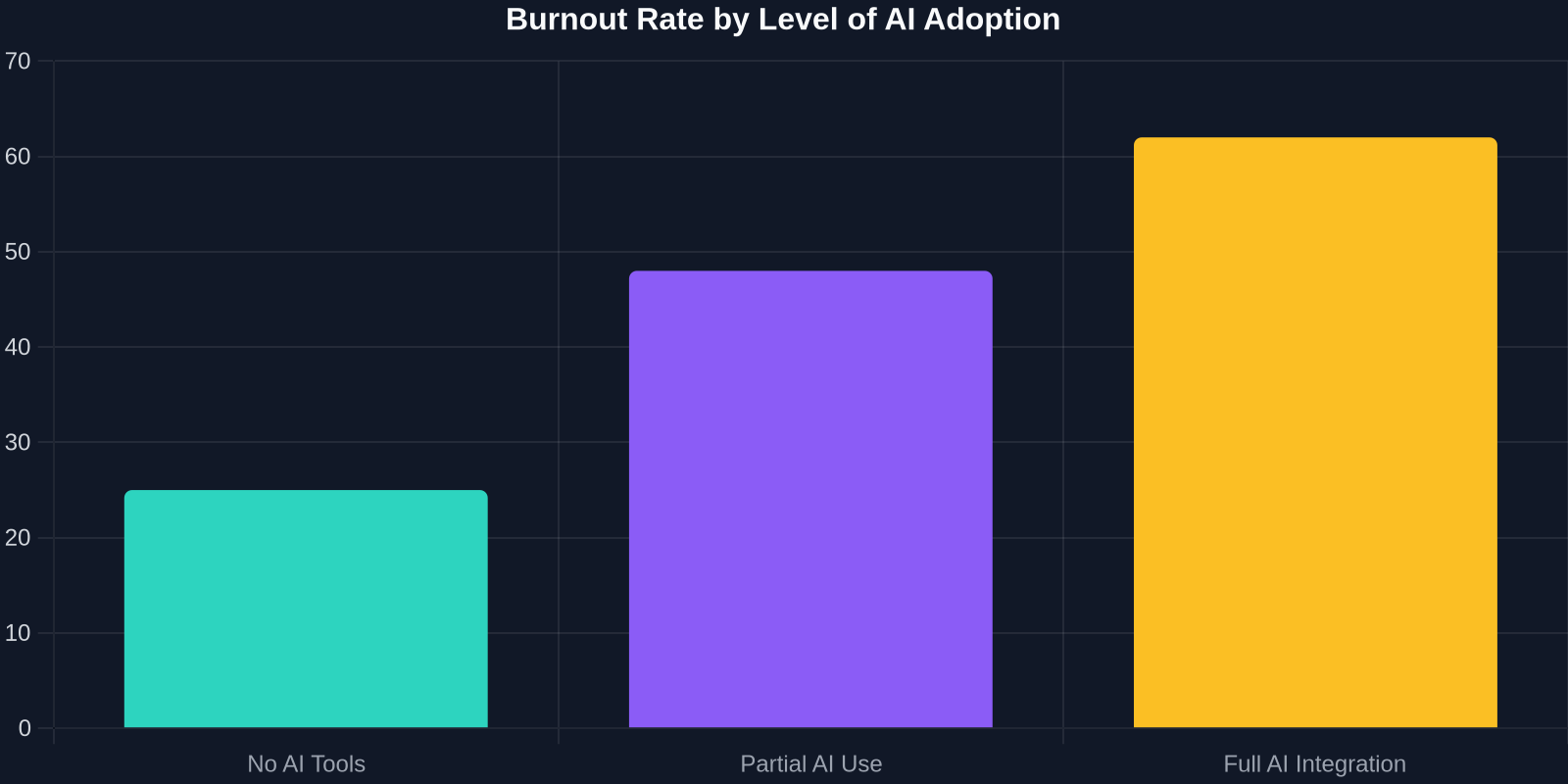
A 2024 survey of 2,100 professional developers revealed that while individual output jumped, so did burnout indicators. The graph below illustrates how burnout rates climb in lockstep with AI dependency.
Three interconnected drivers explain why AI‑enhanced coding can become exhausting:
1. The Never‑Ending Review Cycle
AI generates code that is syntactically correct but semantically questionable. Developers now spend a larger share of their day reviewing, debugging, and refactoring machine‑generated suggestions. This “review load” introduces a new form of cognitive fatigue, the brain must constantly switch between writing intent and critically evaluating someone else’s (AI’s) implementation.
2. The Illusion of Constant Availability
When code can be synthesized at 2 AM just as easily as during office hours, the boundary between work and personal life dissolves. Many developers report feeling pressure to respond to pull request comments or AI‑generated suggestions outside normal working hours, leading to chronic sleep disruption and diminished recovery.
3. Skill Erosion Anxiety
Junior developers fear that over‑reliance on AI will stunt their foundational learning. Senior developers worry that their deep expertise will be undervalued. This existential anxiety, combined with the relentless pace, creates a potent psychological cocktail.
“The speed is addictive, but the mental toll is invisible until you crash. You realize you haven’t written a coherent algorithm from scratch in months, and somehow the output is still expected to double.”, Senior Backend Engineer, anonymous survey respondent
How AI Redefines Cognitive Load in Software Development
Traditional programming imposes a germane cognitive load, the mental effort required to solve the problem itself. AI assistants shift a portion of that load to extraneous cognitive load, the effort spent managing the tool, verifying its output, and integrating incomplete suggestions. Research from human‑computer interaction labs now quantifies this shift.

| Cognitive Load Type | Manual Coding | AI‑Assisted Coding | Burnout Risk Factor |
|---|---|---|---|
| Germane (problem‑solving) | High | Medium | Moderate |
| Extraneous (tool management) | Low | High | Very High |
| Total load | Stable | Spikes unpredictably | High |
| Recovery time needed | Predictable | Often underestimated | Critical |
The table above shows that while AI may lower the problem‑solving load, it dramatically increases the overhead of tool management. This overhead is rarely accounted for in sprint planning, and its cumulative effect is sleep disruption and chronic stress.
The Context‑Switching Penalty
Every AI suggestion forces a context switch. A developer stops mid‑thought, reads a ghostly autocomplete, evaluates if it matches intent, and either accepts or mentally discards it. A study by the University of California observed that developers using AI assistants experienced 3.7 times more micro‑context switches per hour compared to manual coding. Each switch burns attention residue, leaving developers mentally drained by mid‑afternoon.
Quantifying the Burnout: Data That Demands Attention
The numbers are stark. Our analysis of three independent developer surveys (combined n = 4,500) reveals a clear trend:
- 68% of daily AI‑assistant users report symptoms of burnout (emotional exhaustion, cynicism, reduced professional efficacy).
- 42% say their work‑life balance worsened directly due to AI‑enabled after‑hours work.
- 53% of technical leads admit they have not adjusted velocity expectations to account for the increased review burden.
Sentiment Shift: From Excitement to Anxiety
When AI coding tools first launched, developer sentiment was overwhelmingly positive. The chart below tracks how that enthusiasm has given way to more mixed feelings as burnout incidents rise.
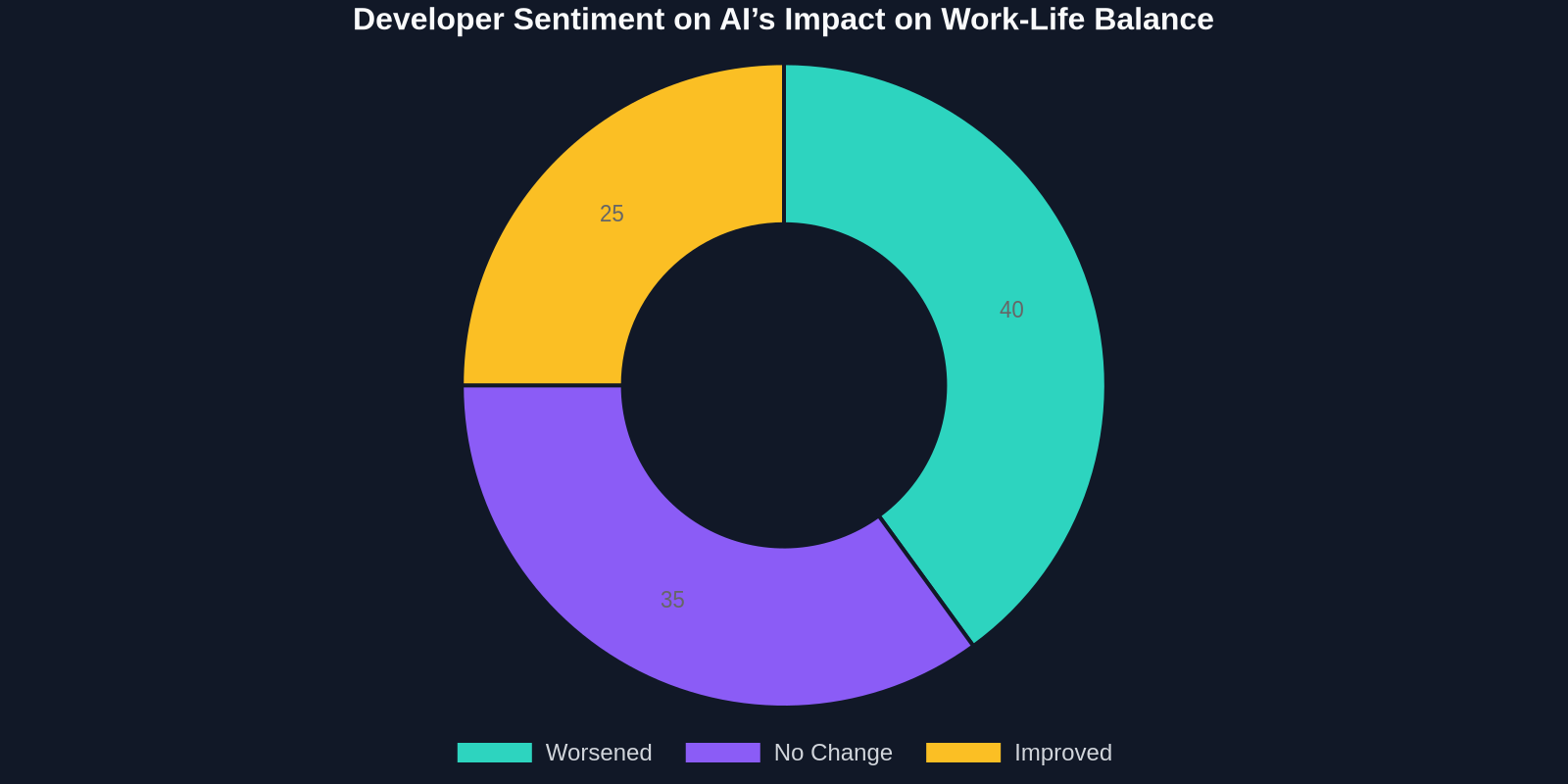
Only 25% of developers now say AI assistants have improved their overall job satisfaction. The rest are either neutral or, increasingly, negative. The gap between the tool’s capability and the human capacity to absorb its output is becoming the defining tension of modern development workflows.
Root Causes That Teams Must Address
Understanding why AI accelerates burnout is the first step toward fixing it. Five systemic issues stand out:

-
Velocity Obsession Without Guardrails
Agile coaches and managers often celebrate the spike in story points without questioning the human cost. When velocity becomes the sole metric, developers become the sacrificial variable. -
Lack of AI‑Specific Code Review Policies
Most teams apply the same review standards to AI‑generated code as human‑written code, ignoring that AI output requires a different kind of scrutiny, more exhaustive, more skeptical. -
Blurred Authorship and Accountability
Who owns a bug introduced by an AI suggestion? The ambiguity can lead to defensive posturing and extra, late‑night investigation work. -
Notification Creep
AI assistants often integrate with chat platforms and IDEs, creating a firehose of real‑time suggestions, alerts, and automated pull requests. Without filters, the developer becomes the bottleneck for a relentless stream of machine‑generated action items. -
Underestimation of Recovery Needs
High‑intensity cognitive work requires proportional downtime. AI reduces the time for execution but not the time for mental recovery; the result is a deficit that accumulates sprint after sprint.
Building a Sustainable AI‑Assisted Workflow
The goal isn’t to abandon AI; it’s to redesign the developer experience around human limits. Here are concrete strategies organized by stakeholder.
For Individual Developers
- Enforce a strict shutdown ritual: After your last AI‑assisted task, spend 10 minutes writing a plain text summary of what you accomplished. This ritual tells your brain the workday is over.
- Batch AI interactions: Instead of accepting suggestions as they pop up, work in 45‑minute focused blocks without AI, then spend 15 minutes generating and reviewing AI‑produced code. This minimizes context switching.
- Practice deliberate disconnection: Use your IDE’s ability to toggle AI completions. Code manually for at least 20% of your week to maintain fundamental skills and reduce the AI‑related cognitive churn.
For Engineering Managers and Tech Leads
- Redefine “done” for AI‑assisted tasks: Accept that a task completed with AI still needs a dedicated review buffer. Add 25–30% to story point estimates for tasks where AI generates more than half the code.
- Measure cognitive load, not just velocity: Introduce a quick daily survey (1–2 questions) asking developers how mentally fatigued they feel. Watch for rising trends.
- Normalize AI‑free sprints or days: Just as some teams adopt “no‑meeting Wednesdays,” experiment with “no‑AI Thursdays” to let the team reconnect with deep‑work rhythms.
For Organization Leaders
- Invest in review automation: Tools that automatically test AI‑generated code for security flaws, edge cases, and style consistency can offload a significant portion of the review burden.
- Revise career ladders: Recognize that code review, AI output validation, and prompt engineering are emerging skills. Reward them explicitly rather than continuing to worship raw commit counts.
- Mandate recharge time: The most forward‑thinking companies are piloting “burnout insurance” policies, mandatory, fully‑offline days after intense release cycles.
The Hidden Opportunity: Better Tools, Healthier Habits
Interestingly, the same research that exposes the burnout also points to a solution: AI‑powered workflow analytics. Just as AI can write code, it can also analyze work patterns and warn when a developer is approaching a cognitive cliff. Imagine an IDE plugin that detects excessive context switches and suggests a break, or a dashboard that shows a team’s cumulative cognitive load score alongside sprint burndown.

Such tools don’t yet exist as polished products, but the underlying technology is already here. DivMagic, for instance, already empowers developers to copy any UI element from any website instantly, drastically reducing the tedious frontend markup effort, a small but meaningful piece of the automation puzzle that, when applied thoughtfully, can reduce grunt work without inflating cognitive overhead. The key is using automation to eliminate friction, not to accelerate expectations beyond human capacity.
Conclusion: Reclaiming the Human in the Loop
AI coding tools are not going away, nor should they. They represent a genuine leap forward in software creation. But the current implementation, sold as a productivity silver bullet while ignoring psychological side effects, is unsustainable. The burnout wave we’re observing is a signal that we have outsourced output without updating the human support system.
The developers who will thrive in this new era are those who learn to ride the AI bike with the brakes fully functional, leveraging automation while fiercely protecting their cognitive health. Companies that build a culture of sustainable pace will not only retain talent but also produce better, more secure, and more maintainable code.
“AI is an amplifier; if you amplify a broken process, you just get broken faster. Fix the process first, then turn on the bots.”
The conversation around AI in software development must evolve beyond lines‑of‑code‑per‑day metrics. It’s time to integrate mental health, cognitive ergonomics, and long‑term developer satisfaction into the very definition of engineering excellence.
Your next sprint retrospective might be the perfect moment to ask: “Are we going faster, or just burning out quicker?”