

The recent wave of federal mandates is accelerating a homogeneous design language across .gov domains. For developers and UI engineers, embracing the U.S. Web Design System is no longer optional, it has become a critical workflow requirement. This professional guide breaks down the technical anatomy of USWDS, the implementation strategies required to meet GSA compliance, and how developers can leverage design-to-code automation tools to drastically reduce the migration burden.
The Technical Blueprint of USWDS: More Than a Style Guide
At its core, the U.S. Web Design System is a design system supported by a robust codebase. It provides a library of reusable HTML, CSS, and JavaScript components designed to create accessible, mobile-friendly, and consistent user experiences. For frontend developers, understanding the underlying architecture of USWDS 3.0 is the first step toward successful implementation.
Component Architecture and Tokenization
USWDS moves beyond simple utility classes by embracing design tokens. These tokens are the visual design atoms of the system, storing values for color, spacing, typography, and elevation. Instead of hardcoding hex values or pixel sizes, developers interact with semantic variables like 'blue-50v' or 'margin-205'.
The technical stack relies on a uswds-core package that compiles these tokens into a final CSS output. Theming becomes a function of overriding these tokens rather than writing cascading overrides. This approach ensures that when you implement a card or an alert, it retains spacing consistency and color contrast across the entire system. However, extracting and understanding these token-to-code relationships from legacy code can be tedious.
The Grid and Utility Framework
USWDS utilizes a modified version of the layout grid, offering a flexible 12-column structure with responsive breakpoints. The system’s utility classes follow a responsive naming convention (tablet:grid-col-6), which aligns with modern mobile-first development practices.
Crucially, USWDS emphasizes proper HTML semantics. Developers cannot simply wrap everything in a <div>; the system strictly validates heading hierarchies and ARIA roles. Submitting a page that fails the component’s accessibility audit means failing the mandate.
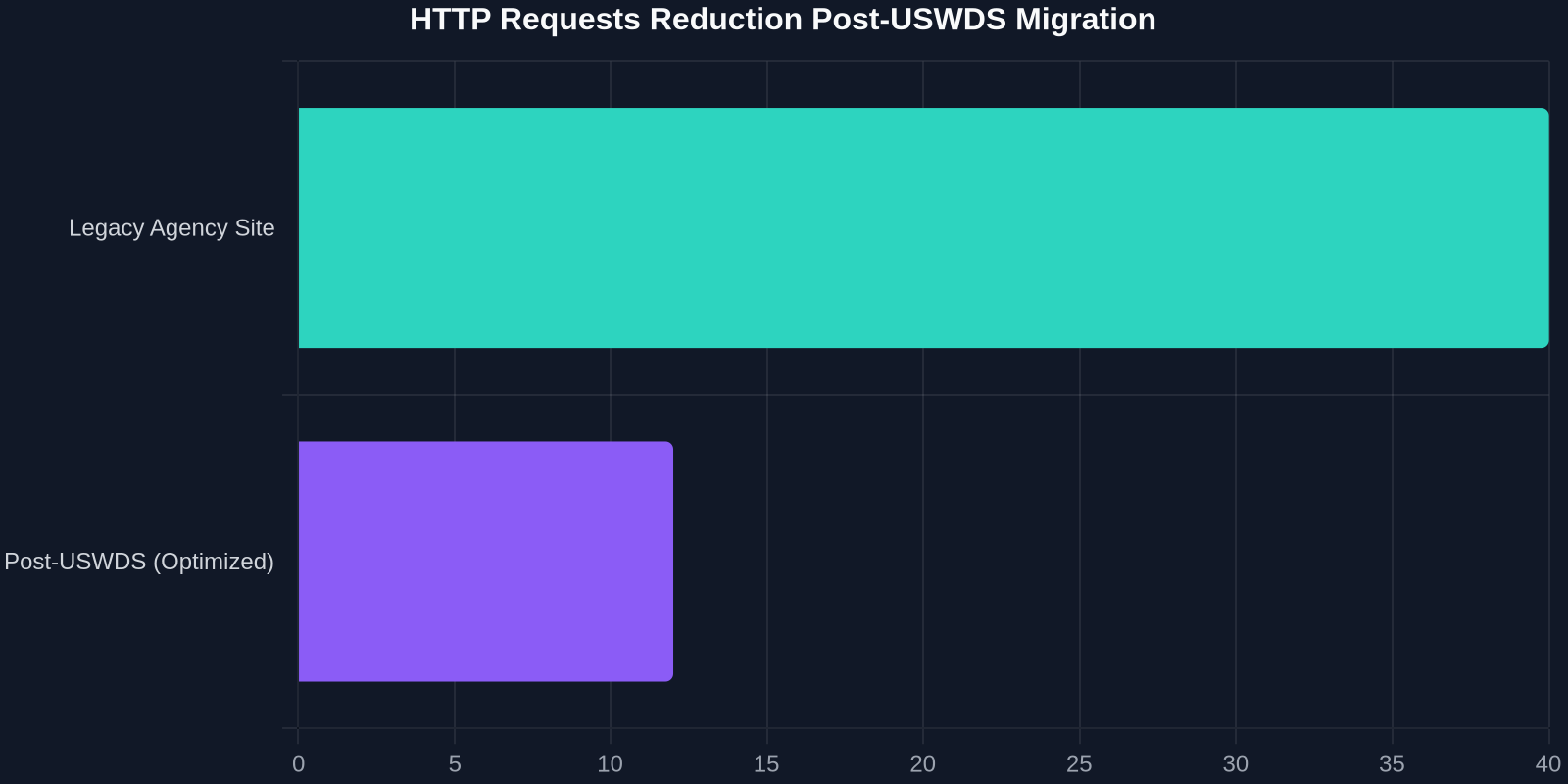
Implementing the Mandate: From Legacy Chaos to Unified Code
The directive spearheaded by the GSA’s Technology Transformation Services (TTS) isn't just advisory, it comes with hard deadlines for agency compliance. The technical challenge lies in decoupling legacy frontends from aging CMS backends without losing content integrity.

Cleaning the Legacy Cascade
Most federal websites suffer from “CSS specificity wars,” where years of patches, plugin styles, and inline overrides create an unmaintainable cascade. Forcing USWDS on top of this legacy code without cleanup results in visual fragmentation.
A professional migration workflow requires an iterative “carve-out” process:
- Isolate legacy UI patterns that visually break under USWDS resets.
- Map legacy CSS variable names to USWDS token equivalents.
- Rebuild atomic components using pure USWDS markup to ensure compliance.
This is where design-to-code converters enter the critical path. Manually rewriting hundreds of HTML components to match the precise USWDS syntax is often the bottleneck that threatens compliance deadlines.
Bridging the Gap: Automating the USWDS Supply Chain
Visualizing the target state is easy; converting it to code is hard. Agency teams are under pressure to replicate existing approved designs using strictly compliant USWDS components. Traditionally, a developer would need to constantly reference the designsystem.digital.gov documentation, manually typing out utility classes and adjusting markup.
Tools designed to copy UI from any website offer a significant productivity boost. Using a UI extraction browser extension, a developer can capture a pre-approved design prototype, a Figma output, or even a legacy component they wish to standardize. The tool analyzes the visual layout, structure, and CSS properties, converting them into clean, semantic HTML.
| Workflow | Lines of Code | Time to Production | Compliance Risk |
|---|---|---|---|
| Manual USWDS Coding | ~500 lines/view | 4-6 hours | High (human error) |
| Visual Copy with Auto-Conversion | ~10 lines to grab | 1-2 hours (including refinement) | Low (standardized output) |
The key is not just copying. It’s the intelligent mapping of raw CSS to the nearest design token or USWDS utility class. This drastically cuts down the time spent memorizing obscure class names like .usa-nav__primary-item and allows developers to focus on state management and API integration.
Component-Level Conversion Strategy
For a seamless transition to USWDS, development teams need to adopt a component-driven architecture that mirrors the GSA’s intent. The goal isn't just visual similarity; it's structural parity.

Navigation and Header Standardization
Federal navigation utilities are notoriously complex due to deep dropdown menus. USWDS mandates specific usa-nav and usa-menu-btn structures. Automating the copy of an existing mega-menu and converting its nested <ul> lists into the USWDS-expanded format can save a developer an entire day of recursion coding. By extracting the UI code directly, you get the correct ARIA labels and tabindex management enforced by the system out of the box.
Form and Input Refactoring
Forms represent the highest interaction risk during a takeover. USWDS forms come with a strict markup pattern for hints, error states, and labels.
Synthesizing the Design Token Shift
One of the more abstract technical hurdles is moving from fixed hex values to USWDS design tokens. CSS files in legacy scopes will look like .sidebar { background-color: #2c3e50; }. The compliant target is .sidebar { background-color: color('blue-70v'); }.
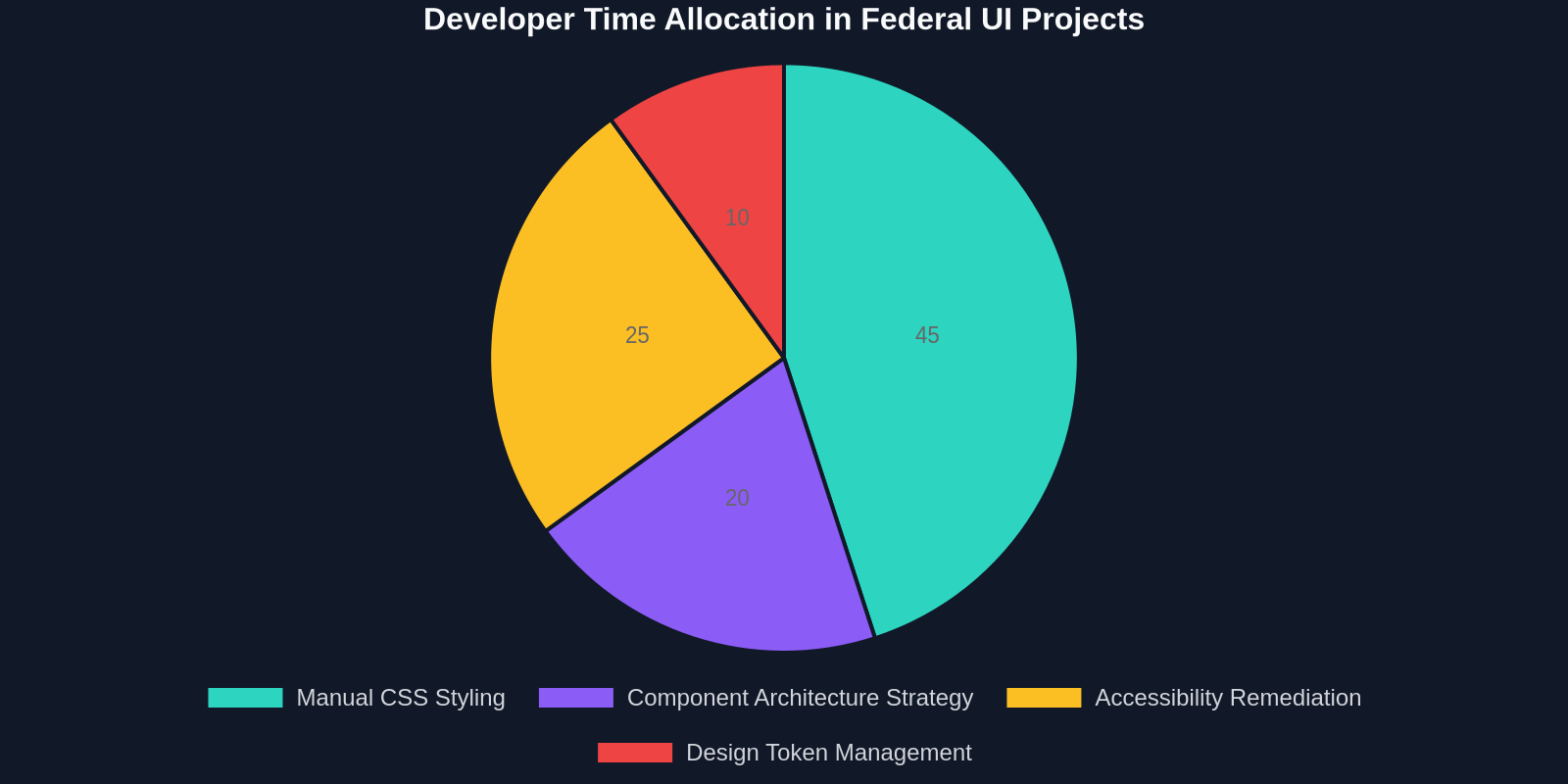
Translation tools and browser extensions that capture CSS properties during the copy process can now be configured to prefer design tokens over raw values. This synthetic mapping ensures that when the USWDS team updates system colors for contrast, your agency’s dark-mode toggle automatically inherits the correct accessibility ratios without manual intervention.
Theming the Unified Enterprise
Agencies often have sub-brands (e.g., a specific museum, a specialized registry) that require visual differentiation without diverging from the system. USWDS handles status via thematic custom properties. By using an extraction workflow, a team can copy a sub-brand’s existing “hero” visual, paste the code, and then programmatically swap limited design tokens (like $theme-color-primary) to meet branding needs while staying in the artisan USWDS framework.
Federal developers are moving from 'pixel pushing' to strategic architecture, letting design tokens handle the visual constants while adding high-value functionality.
The GSA Compliance Validation Stack
Compliance isn’t achieved in the editor; it’s validated in the CI/CD pipeline. The GSA and 18F groups strongly advocate for automated testing to enforce the design system.
For a robust pipeline, automated visual regression testing must compare the extracted and refactored component against the official USWDS storybook exactly as they appear in a browser, confirming structural fidelity at a pixel level. Integrating UI code export into this pipeline allows teams to rapidly prototype a compliant site version and compare it to the baseline using tools like BackstopJS or Percy.
Validating HTML Structure vs. Visual Appearance
A critical distinction in compliance is that looking “right” to the naked eye isn't sufficient. The HTML must match the prescribed USWDS component pattern. Screenshot-based copying from a browser approximated to USWDS but isn't native unless the tool uses an algorithm trained on the system’s markup. Premium converters analyze the DOM structure of a compliant reference site and produce code that includes not just the color and size, but the correct aria-describedby IDs and role attributes.