

The Hidden Costs of Front-End Complexity: How to Reclaim Your Development Speed
If you’ve built a web application in the last five years, you’ve felt it. The mental weight of managing React hooks alongside Redux, juggling TypeScript configurations, tuning endless Webpack loaders, and then still wrestling with CSS specificity demons. Modern front-end development has become breathtakingly powerful, and bewilderingly complex. A recent Infoworld feature, “The Hidden Cost of Front-End Complexity,” crystallizes what many developers feel but few articulate: every abstraction layer, every build plugin, and every “quick setup” tool carries an invisible tax that extracts a toll in build minutes, cognitive load, and real dollars.
This isn’t a complaint about progress. It’s an examination of the quiet, compounding expenses of complexity that don’t show up in a Jira ticket. In this article, we’ll dissect those hidden costs, back them with data, and explore actionable strategies to streamline your workflow, including a surprisingly simple approach that lets you capture production-ready UI from anywhere on the web and drop it directly into your project.
The Myth of “Free” Abstraction
Frameworks like React, Vue, and Angular promise to make UI development more declarative and maintainable. And they deliver, up to a point. The problem arises when we treat abstractions as cost-free boundaries. Every layer of abstraction, HOCs, render props, composables, signals, middleware, adds an overhead to the developer’s mental model and often to the application’s runtime performance. Consider this innocuous example:
// A simple, direct approach
const Greeting = ({ name }) => <h1>Hello, {name}</h1>;
Now consider the same component wrapped in multiple abstractions common in a large codebase:
const mapStateToProps = (state) => (\{ name: state.user.name \});
const withGreetingLogger = (WrappedComponent) => (props) => \{
  useEffect(() => console.log('greeting rendered'), []);
  return <WrappedComponent \{...props\} />;
\};
const GreetingContainer = connect(mapStateToProps)(
  withGreetingLogger(
    withTheme(
      withTranslations(Greeting)
    )
  )
);
The second version is harder to debug, slower to test, and requires a new team member to trace through four layers of indirection to understand what the component actually does. Over an application of 500 components, this pattern adds measurable time to every code review and every onboarding session. A study by ACM ICPE 2025 quantified this: installing a hookpoint (a cross-cutting concern) taxes every process that crosses it, adding overhead even when the hook’s logic is trivial.
Hidden overhead isn't theoretical. ACM ICPE 2025 measurements show that untraced processes can increase response latency by up to 30%, simply because of the presence of hookpoints that intercept every interaction.
The Build Tool Tax
One of the most concrete hidden costs is the build. In 2019, a typical front-end project might run its dev server in two seconds. By 2024, the average enterprise project often takes 50 seconds or more to spin up. That’s 25x growth in waiting time over five years.

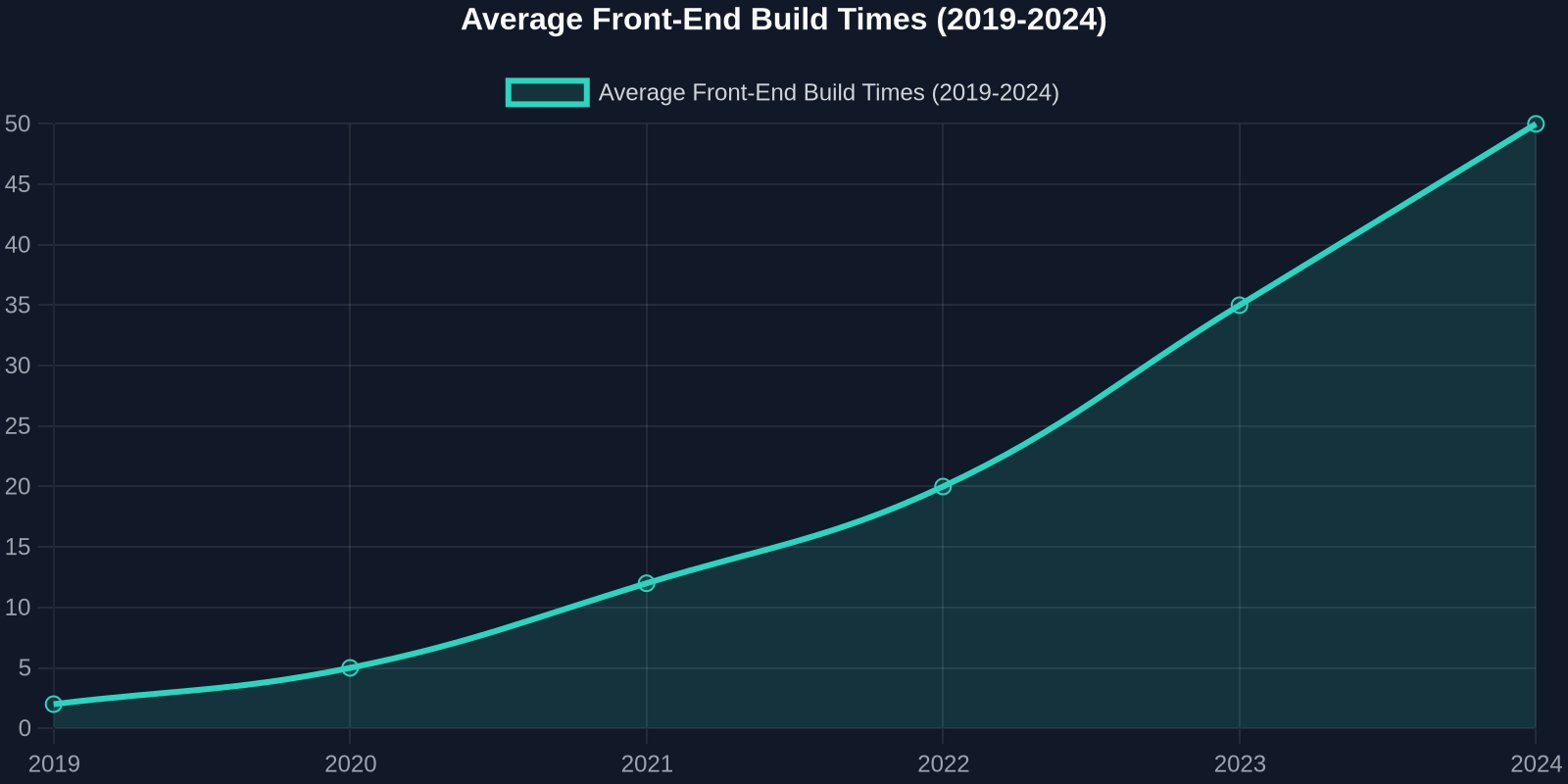
Why? Because each new dependency, each code generator, each post-CSS plugin, each tree-shaking pass, and each type-checking step adds up. Developers don’t feel the pain in one explosive moment; they endure a thousand small cuts every time they hit save. A 45-second rebuild may seem trivial, but multiply it by 50 saves a day across a team of 10 developers, and you lose nearly 40 developer-hours per week to waiting. In transactional sectors, IT downtime costs about $9,000 per minute, according to industry research, and while a slow build isn’t server downtime, the compounding effect of delayed feature delivery easily translates into revenue impact.
Modern tools like Vite and esbuild have emerged precisely to combat this, leveraging native ES modules and aggressive caching. Yet many teams are locked into older configurations because migrating a complex Webpack config is a multi-week effort, itself another hidden cost of past complexity decisions.
Even “done” build configs rot. A Webpack config that was optimal two years ago may now be the single biggest drag on your team’s velocity. Auditing and pruning your toolchain every quarter is not a luxury, it’s a necessity.
The Maintenance Maze: Tech Debt That Compounds
Front-end complexity doesn’t just slow you down today; it accelerates tomorrow’s decay. Dependency updates, breaking changes in major versions, and the ever-shifting landscape of “best practices” force front-end teams into a constant state of triage. The 2025 Employee Sentiment Study revealed a startling statistic: 60% of employees are considering a job change, and in tech, tooling fatigue is a leading driver of burnout.
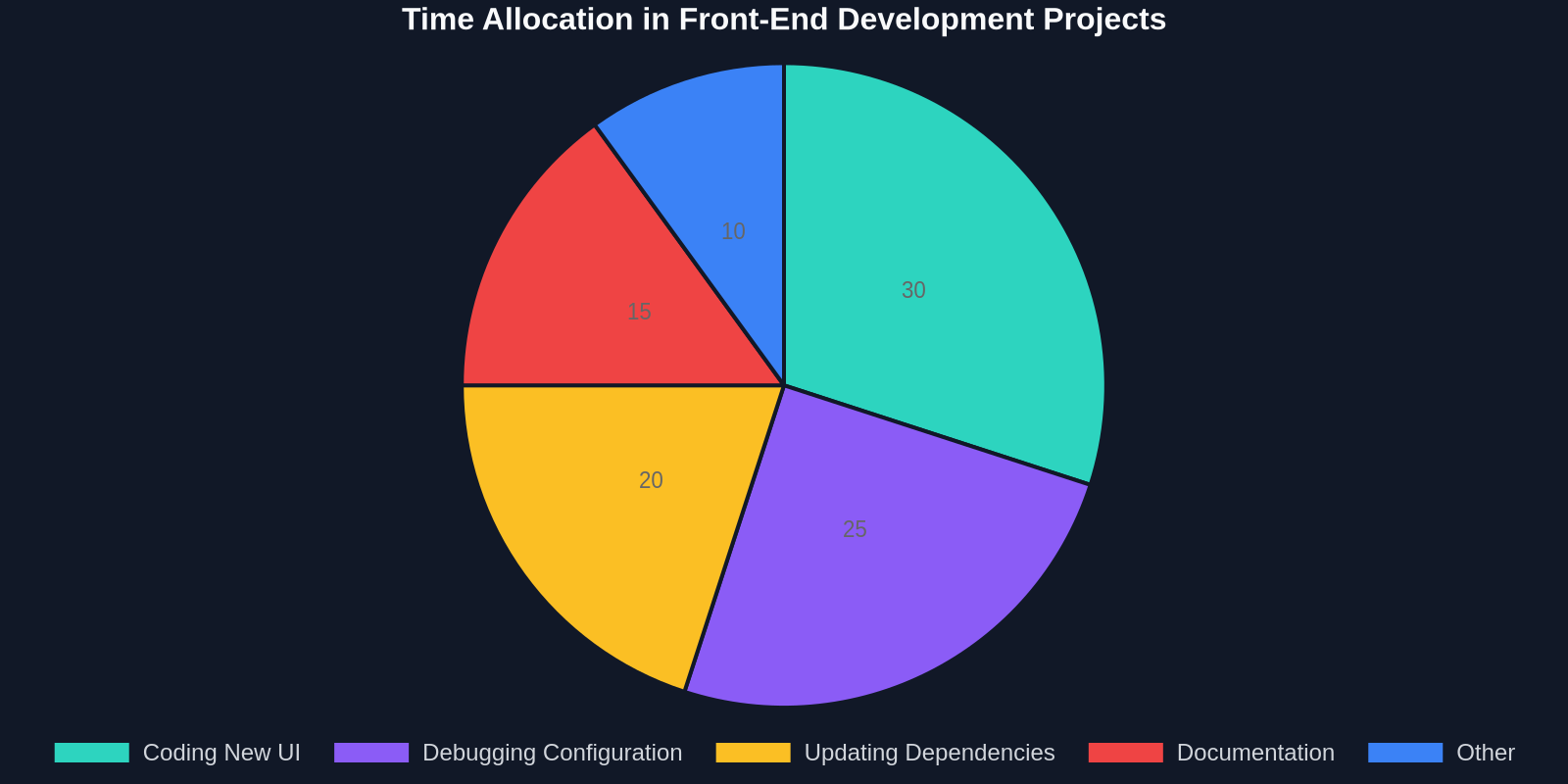
Maintaining a complex front-end typically consumes three types of resources: time spent updating configurations, time spent refactoring code that no longer aligns with newer patterns, and, most critically, time spent simply understanding what the existing code does. When you build every button, modal, and form field from scratch, you’re not just spending time creating; you’re accumulating a maintenance debt that will demand interest every sprint.
The table illustrates a critical insight: the most expensive line of code you can write is the one that duplicates existing work. Extracting proven UI patterns from the web and reusing them not only accelerates initial development but dramatically reduces long-term maintenance.
The Psychophysiological Toll of Constant Context Switching
Perhaps the most insidious hidden cost is measured not in seconds or dollars, but in cortisol levels. A 2026 study by G.R. Lau and colleagues, published at CHIIR, uncovered a “hidden psychophysiological price” for developers who spend their days toggling between IDEs, build tools, browser DevTools, package manager outputs, and design specs. The sustained cognitive juggling required by a fragmented front-end toolchain leads to measurable increases in stress and decreases in creative problem-solving ability.

The true cost of front-end complexity isn’t in lines of code, it’s in the cognitive load that erodes your team’s morale and capacity for thoughtful innovation.
Every time you context-switch, to restart a dev server, to investigate a cryptic Babel error, to read a changelog for a minor patch that broke your app, you pay a “resumption cost” that can steal 15 minutes or more of deep focus. Over a week, that’s hours of lost flow state. This is why many of the most productive front-end developers obsessively minimize their tool count and avoid premature abstractions.
The most effective way to reduce front-end stress is to reduce the number of decisions you make per hour. Standardize, automate, and, wherever possible, copy instead of create.
Strategies to Simplify Without Sacrificing Power
The solution isn’t to abandon modern frameworks or return to jQuery. It’s to be ruthlessly intentional about what complexity you invite into your stack and to use tools that collapse the distance between idea and implementation. Here are five concrete steps:
1. Start with the Output, Then Choose the Tool
Instead of picking the shiniest framework and then forcing your UI into its patterns, begin by defining the user experience you need. Often, a simpler library or even vanilla HTML/CSS with a modest sprinkling of JavaScript is enough. For more dynamic interfaces, prefer libraries that stay close to the platform (like Lit or Solid) over those that add heavy runtime abstractions.
2. Embrace “Copy Original” Workflows
Why code a navigation bar, a pricing table, or a dashboard card from scratch when thousands of well-tested, production-hardened versions already exist on the web? With DivMagic, you can capture any UI element, its exact HTML structure and CSS, from any website and drop it into your project. You get a clean, standalone implementation that you can adapt, skip the endless tweaking of margins and colors, and move directly to your unique business logic. This transforms copying UI from a “hack” into a legitimate, efficient development pattern that preserves quality while slashing hours from your sprint.
3. Audit Your Build Pipeline Relentlessly
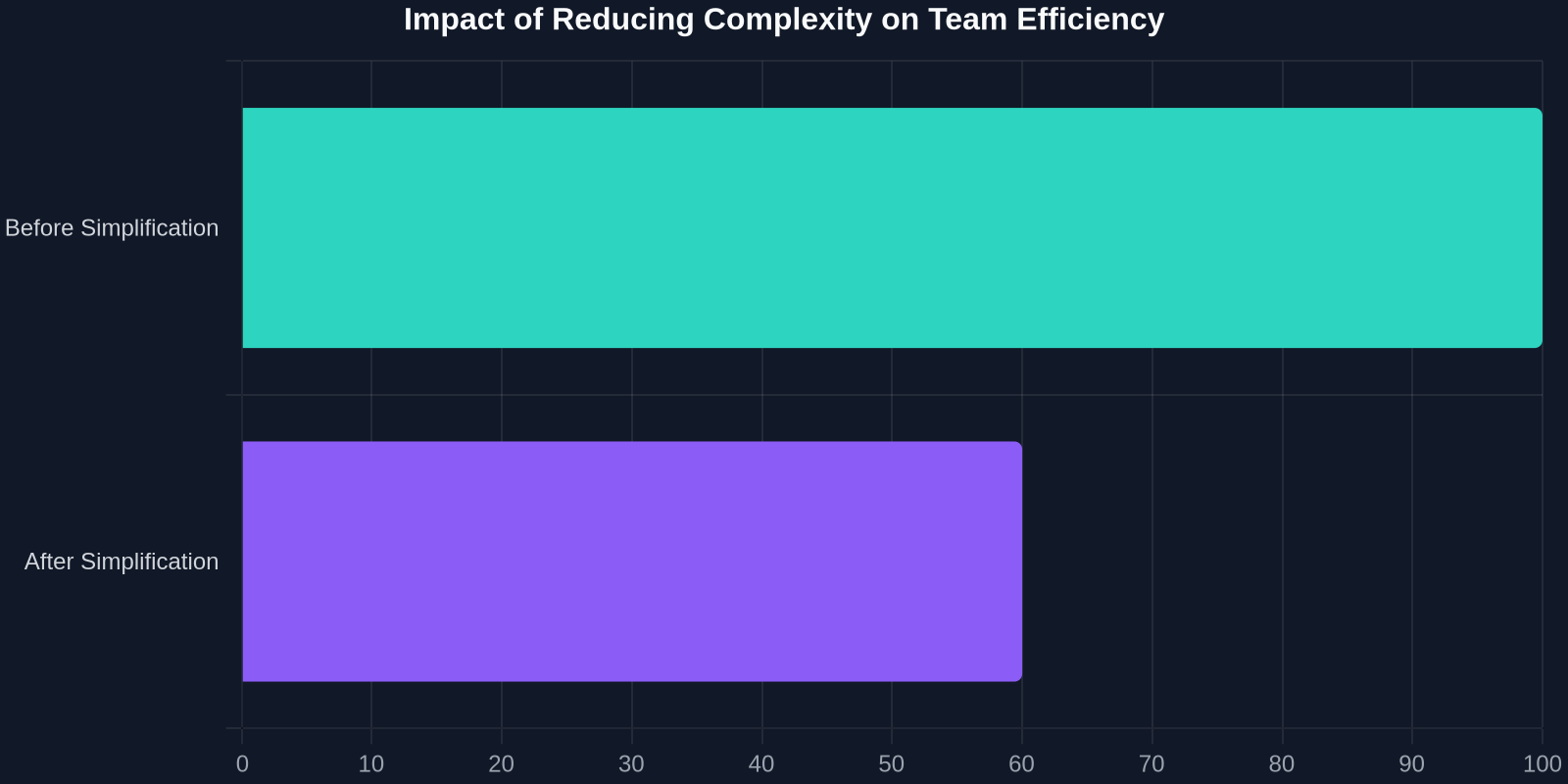
Host a quarterly “build review” where you time your build and analyze each step. Remove plugins you no longer use, upgrade to newer, faster tools, and consider monorepo tooling like Turborepo or Nx to parallelize. As the chart below shows, teams that systematically simplified their toolchain saw a dramatic drop in time-to-iterate.
4. Limit Your Abstraction Layers to Two
A rule of thumb: if you need to explain your component’s logic by referencing more than two abstraction layers (e.g., Container → Presenter is fine; Container → Provider → Connector → Presenter is a red flag), you’re probably over-engineering. Flatten your structures.
5. Invest in Visual Regression and Automated Testing
One major driver of complexity growth is fear of breaking things. Teams add layers of abstractions and trampolines to avoid touching fragile code. Robust visual regression tests (with tools like Chromatic or Percy) and end-to-end tests give you the confidence to simplify aggressively, because you’ll know immediately if you’ve changed output.
Reclaiming Speed with DivMagic: Complexity Ends at a Click
Throughout this article, we’ve stressed that every extra minute you spend configuring, debugging, or re-re-creating UI is a minute not spent on features that differentiate your product. DivMagic was built for developers who understand that reuse is the ultimate antidote to complexity. Instead of wrestling with CSS grid templates or trying to reverse-engineer that perfect hover effect you saw on a competitor’s site, you click the element, copy it, and make it your own. The output is clean, framework-agnostic HTML and CSS, so you can drop it into React, Vue, Svelte, or plain HTML without adding yet another dependency to your pile.

The hidden costs of front-end complexity are real, measurable, and, most importantly, reversible. By cutting the time you spend on repeated UI construction, by reducing the number of moving parts in your toolchain, and by valuing output over architecture, you can build faster, with less stress, and with a codebase that stays lean. In a world where every second of a developer’s attention is precious, the ability to instantly capture and adapt production UI is no longer a convenience, it’s a competitive advantage.
Try DivMagic today and feel the difference: less tooling fatigue, more working software, and a front-end workflow that finally respects your time.