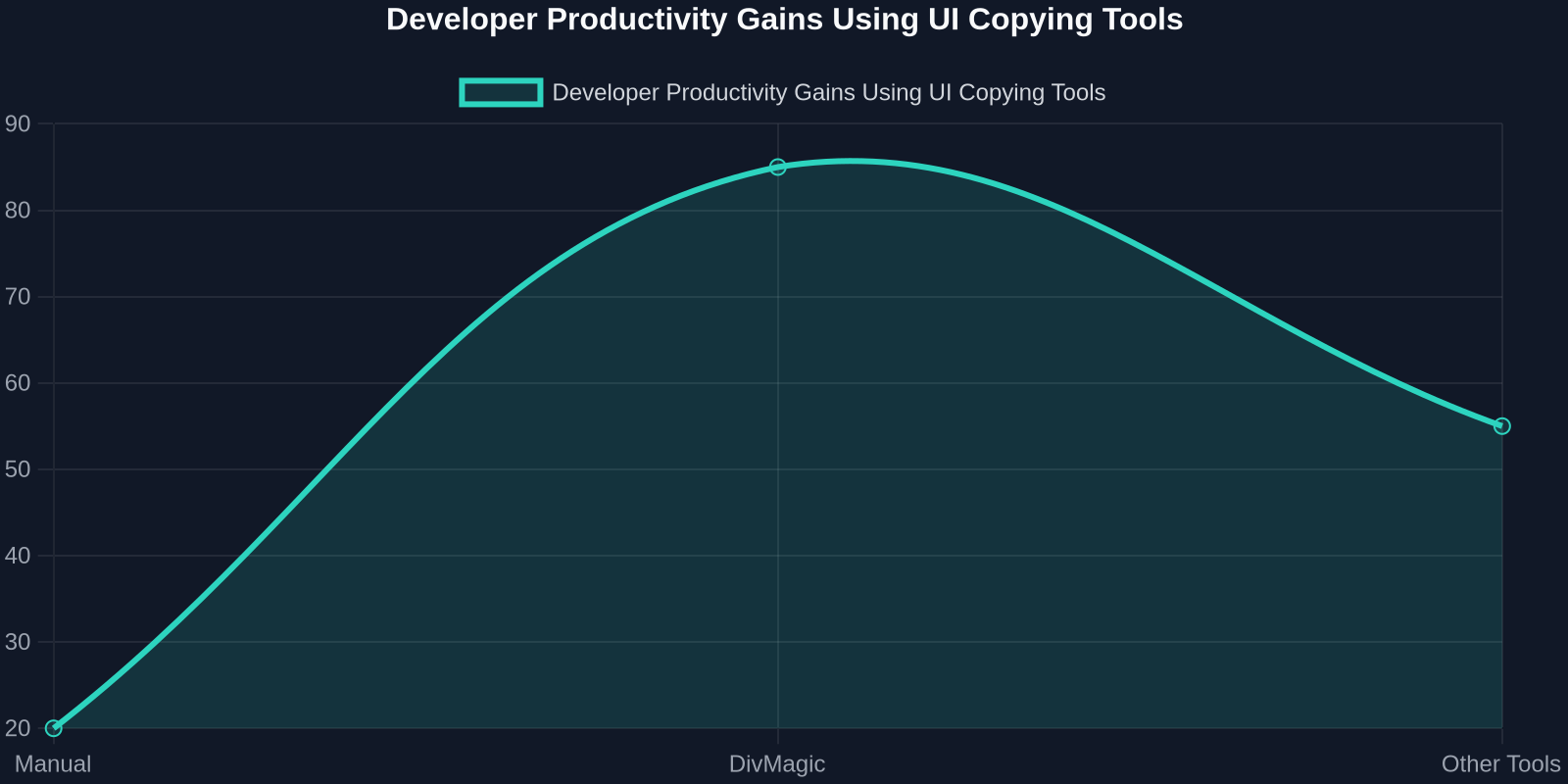

In the ever-evolving world of web design, user interfaces often borrow from real-world metaphors to create intuitive and engaging experiences. One such trend that has quietly taken over product dashboards, collaboration tools, and even personal websites is the Page Notes UI pattern, a digital homage to sticky notes, pinned reminders, and handwritten annotations. This design approach, made famous by platforms like Trello, Notion, and Miro, uses small, moveable, and often colorful note cards that users can write on, drag, and organize freely. For frontend developers, replicating this playful yet functional interface can be surprisingly complex. That’s where DivMagic comes in, a browser extension that lets you copy any UI component from any website, including those elusive sticky note layouts, with pixel-perfect accuracy.In this guide, we’ll deconstruct the anatomy of Page Notes, walk through a complete code example, explore advanced features like drag-and-drop and persistence, and show you how DivMagic can save you hours of reverse-engineering. Whether you’re building a kanban board, a note-taking app, or just want to add a touch of whimsy to your landing page, this post will equip you with both the manual techniques and the ultimate shortcut.The Rise of Sticky Note InterfacesSticky notes in UI are not a new invention, Microsoft’s Sticky Notes app dates back to Windows 7, and physical post-it notes have been on monitors for decades. But their digital resurgence in web applications is driven by a need for lightweight, customizable, and visually engaging content blocks. According to a 2024 survey of UI/UX designers, Let’s break down what makes a great Page Note component.Anatomy of a Page NoteA typical sticky note UI consists of four core parts:Container: A div with a background color (often yellow, sticky-note hue), subtle box-shadow, and a slight rotation for that “tossed on the board” look.Header/Option Bar: Sometimes includes a color picker, a delete button, or a drag handle.Content Area: Typically a contenteditable div or textarea for inline editing.Footer/Metadata: Timestamp, author avatar, or tags.The CSS magic lies in the visual details:.sticky-note width: 200px; min-height: 200px; background: #fff9c4; box-shadow: 3px 3px 10px rgba(0,0,0,0.15); transform: rotate(-2deg); padding: 16px; font-family: 'Comic Sans MS', 'Chalkboard SE', cursive; border: 1px solid #e6dba0; margin: 12px; position: absolute; cursor: grab;.sticky-note:hover transform: rotate(0deg) scale(1.02); transition: 0.2s ease; box-shadow: 5px 5px 15px rgba(0,0,0,0.2);While this CSS looks straightforward, copying the exact look of a note from a site like Trello or Notion requires pixel-perfect attention to shadows, typography, and even the subtle paper texture gradients. That’s where manual inspection with DevTools can become time-consuming, especially when the source uses CSS-in-JS or minified styles.Building a Full Page Notes InterfaceLet’s build a small demo: a virtual corkboard with draggable, editable sticky notes. We’ll use vanilla JavaScript for simplicity, but the same principles apply to React, Vue, or Angular.Step 1: HTML Structure<div id="corkboard"> <div class="sticky-note" style="left:50px; top:80px; background:#ffcccc;"> <div class="note-header"> <button class="delete-btn">X</button> </div> <div class="note-content" contenteditable="true">Meeting notes for sprint review</div> </div> <div class="sticky-note" style="left:300px; top:150px; background:#cce5ff;"> <div class="note-header"> <button class="delete-btn">X</button> </div> <div class="note-content" contenteditable="true">Design review feedback</div> </div> <button id="add-note">+ Add Note</button></div>Step 2: CSS for the Corkboard and Notes#corkboard position: relative; width: 100%; height: 80vh; background: #8b5e3c url('cork-texture.png'); border: 8px solid #654321; overflow: hidden;.sticky-note position: absolute; width: 220px; min-height: 180px; padding: 12px; font-family: 'Indie Flower', cursive; font-size: 16px; border-radius: 0; transform: rotate(calc(-5deg + 10deg * random())); box-shadow: 2px 4px 8px rgba(0,0,0,0.2); cursor: move; user-select: none;.note-header display: flex; justify-content: flex-end; margin-bottom: 8px;.delete-btn background: transparent; border: none; font-weight: bold; cursor: pointer; opacity: 0.5;.delete-btn:hover opacity: 1; Step 3: JavaScript for Drag-and-Drop and Add Notelet offsetX, offsetY, note;document.querySelectorAll('.sticky-note').forEach(n => n.addEventListener('mousedown', startDrag););function startDrag(e) note = e.target.closest('.sticky-note'); if (!note) return; const rect = note.getBoundingClientRect(); offsetX = e.clientX - rect.left; offsetY = e.clientY - rect.top; document.addEventListener('mousemove', drag); document.addEventListener('mouseup', stopDrag);function drag(e) note.style.left = (e.clientX - offsetX) + 'px'; note.style.top = (e.clientY - offsetY) + 'px';function stopDrag() document.removeEventListener('mousemove', drag); document.removeEventListener('mouseup', stopDrag);document.getElementById('add-note').addEventListener('click', () => const newNote = document.createElement('div'); newNote.className = 'sticky-note'; newNote.style.left = Math.random() * 400 + 'px'; newNote.style.top = Math.random() * 300 + 'px'; newNote.style.background = randomPastel(); newNote.innerHTML = <div class="note-header"><button class="delete-btn">X</button></div><div class="note-content" contenteditable="true">New note</div>; document.getElementById('corkboard').appendChild(newNote); newNote.addEventListener('mousedown', startDrag););This is a functional MVP, but production-ready Page Notes require state management, localStorage persistence, and responsive sizing. Let’s look at advanced enhancements.Advanced Features: Persistence and ResizingA real-world sticky note board would save notes across sessions. Here’s a quick localStorage implementation:function saveNotes() \ const notes = []; document.querySelectorAll('.sticky-note').forEach(n => \ notes.push( id: n.dataset.id || Date.now(), left: n.style.left, top: n.style.top, content: n.querySelector('.note-content').innerText, color: n.style.background ); ); localStorage.setItem('boardNotes', JSON.stringify(notes));\function loadNotes() \ const data = JSON.parse(localStorage.getItem('boardNotes')); if (!data) return; data.forEach(note => // create note div and set properties );\Resizing is trickier. Many implementations use a small handle in the bottom-right corner. With CSS resize: both; you can make any div resizable by the user, but the content may overflow. A better approach uses a mutation observer.The complexity of these features is why many developers turn to libraries like react-draggable or interact.js. But even those require careful styling to match the exact look.Manual Copy vs. DivMagic: A Time ComparisonLet’s imagine you see a beautiful sticky note design on a site like TrendHunter’s Page Notes trend page and want to use it in your project. Doing it manually involves:Inspecting the element in DevToolsCopying all computed styles (which may include pseudo-elements, gradients, filters)Recreating the HTML structure (often obfuscated by React components)Adjusting breakpoints and responsive behaviorPorting to your frameworkWith DivMagic, you simply right-click the element, select “Copy as DivMagic”, and get clean, ready-to-paste HTML/CSS. The extension handles nested elements, pseudo-classes, and even CSS variables.Common Pitfalls When Implementing Page NotesEven with a solid codebase, developers hit snags:z-index stacking: With many absolute-positioned notes, managing which is on top is tricky. Use a simple stacking order by incrementing z-index on mousedown.Performance: 200+ notes with individual event listeners can lag. Consider event delegation on the corkboard container.Accessibility: contenteditable elements need ARIA roles and keyboard navigation (Tab, Enter, Escape).// Event delegation for drag startdocument.getElementById('corkboard').addEventListener('mousedown', function(e) const note = e.target.closest('.sticky-note'); if (!note) return; // bring to front note.style.zIndex = ++zIndexCounter; startDrag(e, note););DivMagic can help by giving you a solid foundation that already includes many best practices, but you’ll still need to integrate it into your app’s state management.Using DivMagic to Supercharge Your WorkflowImagine you’re browsing TrendHunter’s Page Notes showcase and see a note with a gorgeous gradient background and a subtle paper-tear border. Instead of spending 20 minutes reverse-engineering, you click the DivMagic icon, highlight the note, and copy. The extension outputs clean, semantic HTML with all the CSS inline or in a style block, ready to drop into your own project.Here’s a typical DivMagic output snippet:<div style="background: linear-gradient(135deg, #fdfcfb, #e2d1c3); padding: 15px; border-radius: 4px; box-shadow: 0 2px 8px rgba(0,0,0,0.1), 0 0 0 1px #eee; transform: rotate(-1deg); width: 200px; min-height: 200px; font-family: 'Patrick Hand', cursive;"> <p contenteditable="true">Your note here...</p></div>It’s that simple. DivMagic even preserves the font imports if they’re from Google Fonts.ConclusionThe Page Notes UI trend is here to stay, offering a delightful and productive way for users to interact with content. As a frontend developer, mastering this pattern, from the basic CSS to advanced drag-and-drop and persistence, can set your applications apart. While manual coding is educational, the fastest path to a production-ready note board is often a hybrid: build your core logic, but use DivMagic to copy exemplary designs from the web.We’ve seen that is a game-changer for tight deadlines. And with trends like Page Notes evolving rapidly, having a tool that keeps you aligned with the latest design language is invaluable.Now go ahead, visit the Page Notes trend page on TrendHunter, find a note design that inspires you, copy it with DivMagic, and build something great. Your users will thank you.