
Apple Turns Safari Users Into Extension Developers With AI: The iOS 27 Game Changer

Apple’s latest move with iOS 27 and Safari is turning every user into a potential extension developer — and it’s all powered by on-device AI. At WWDC 2026, Apple unveiled a massive Siri AI overhaul that integrates third-party AI models directly into the browser. This means you can now build custom Safari extensions using natural language, no coding required. In this post, we’ll explore how Apple is democratizing extension development, the role of Apple Foundation Models, and what this means for privacy, productivity, and the future of browsing.
Why Apple’s Safari AI Upgrade is the Most Underrated iOS 27 Feature
While the world buzzes about the new Siri AI and AI-powered photo editing, Safari is quietly getting a transformative upgrade. Apple’s strategy focuses on enabling users — not just developers — to create personalized browsing experiences through AI.
How Siri AI Extensions Work in Safari
- On-device processing: All AI tasks happen locally using Apple’s Foundation Models, ensuring your data stays private.
- Natural language triggers: You can say “Siri, scan this book for reviews” and Safari executes the extension.
- Third-party AI models: Developers can create extensions that use their own AI models (e.g., plant identification, language translation).
Apple Foundation Models: The Engine Behind the Intelligence
Apple’s Foundation Models are the core of this AI push. These models support up to 3 billion parameters and are designed to run efficiently on iPhone, iPad, and Mac. Instead of relying on cloud servers, Apple’s on-device approach prioritizes speed and privacy.

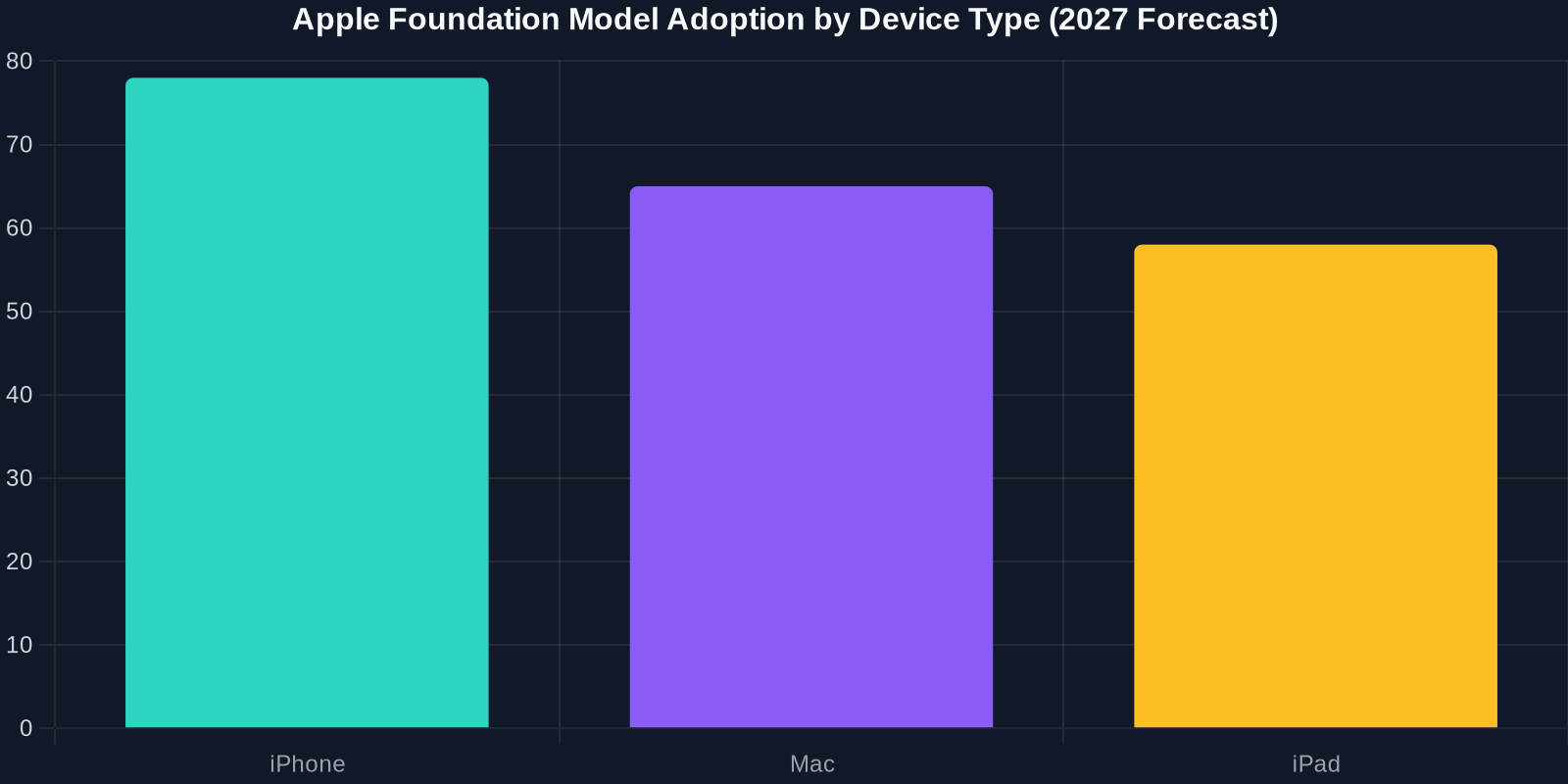
Chart: Apple Foundation Model Adoption by Device Type
This bar chart shows the expected adoption rates of Foundation Models across Apple devices in 2027. The iPhone leads at 78%, followed by Mac at 65% and iPad at 58%.
From Safari User to Extension Developer: No Coding Required
One of the most exciting aspects of iOS 27 is that anyone can become a Safari extension developer using simple natural language commands. Apple is essentially turning users into creators.
Step-by-Step: Creating Your First AI Extension
- Open Safari and navigate to the Extensions preferences.
- Tap “Create New Extension” — this launches a simplified AI builder.
- Describe the extension in natural language (e.g., “Summarize long articles into bullet points”).
- Siri AI generates the extension code using Foundation Models.
- Test it live — the extension runs immediately on the current page.
- Publish or share your extension with others via iCloud.
Privacy-First AI: Why This Matters
Apple’s AI strategy is built on a foundation of privacy. Unlike some competitors that rely on cloud processing, Apple’s on-device models ensure that sensitive data never leaves your device.

Real-World Use Cases for AI-Powered Safari Extensions
1. Real-World Object Recognition
From your phone, use Siri AI to scan books, plants, or even landmarks to get instant information. Safari becomes a window to the physical world.
How to Get Started with Safari AI Extensions
- For users: Update to iOS 27 and explore the new Extensions menu in Safari.
- For developers: Access the Foundation Models API via Xcode and create your first AI extension.
- For businesses: Leverage AI extensions to enhance customer engagement on your website.
The Future: What’s Next for Safari and AI?
Apple’s long-term vision is a browser that understands context, anticipates needs, and protects privacy. Future updates may include:
- Automatic form filling based on AI understanding.
- Real-time collaboration with AI agents.
- Advanced content creation — write emails, generate images, all within Safari.
For more insights, check out Apple’s WWDC 2026 sessions or read the full coverage at TechBuzz AI.